WordPress quirks and features

I will start with the werid experience with one of WP themes – Polite and Polite Grid. I was wondering why my website make double requests on every page. One for the document and other for content. This was annoying as I was unable to measure traffic properly. It turned out that it was because of the theme I’ve been using for some time. Changing it to different one fixed it.

Second of all to make NGINX logs easier to handle I’ve created separate location entry for all the WP things, so the “real” traffic goes only to particular log and everything else goes in different place. Take a look:

location ~ /wp-* {
  access_log /var/log/nginx/michalasobczak.pl.wordpress.access.log;
  ...
} 
location ~ /favicon* {
   ...
}
location / {
  access_log /var/log/nginx/michalasobczak.pl.access.log;
  ...
}

I can now push these logs into Elasticsearch thru filebeat module and need not to bother about all WP-specific things that clutters NGINX logs.
Voltage divider

Lowering the voltage value

[202] The next example I want to present in practice is a popular voltage divider. It allows the output voltage to be reduced to the desired value due to the properties described a little earlier.

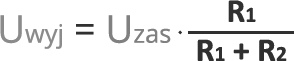
Eq. The output voltage at the divider

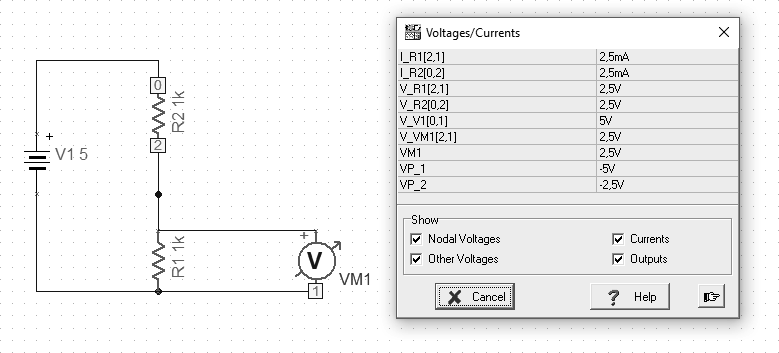
Bearing in mind the above formula, we can assume that we want to reduce the input voltage of 5V to the expected 2.5V at the output. So we use two 1K resistors connected in series.

Fig. Voltage divider (p06)

Examples available at https://github.com/michalasobczak/simple_hpc/tree/master/SeriesPartOne

Kirchhoff’s law

Theory and practice

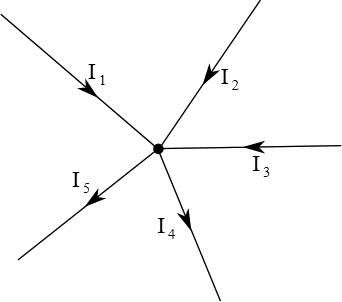
[W] One of the basic principles of current flow is the first law of Kirchhoff, which says that for the electric circuit node, the algebraic sum of flow rates is zero. The sum of currents flowing into the node is equal to the sum of currents flowing out of this node. This law results from the principle of keeping the load.

Fig. Kirchhoff’s first law

Kirchhoff’s second law says that the sum of voltage drops in a closed circuit is zero, assuming that the voltage drop is its negative increase.

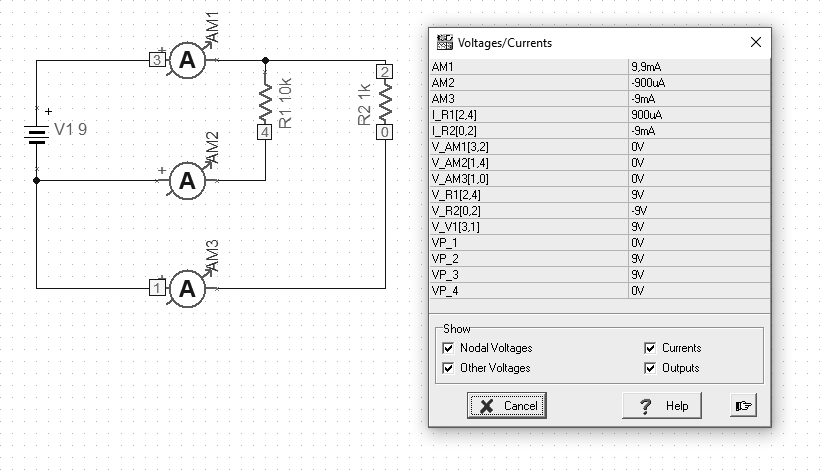
[202] For the purposes of illustrating the law of Kirchhoff, I prepared a simple example below. We start with an example about the first law. 2 resistors are connected, 10k and 1k respectively. We attach 3 ammeters in turn. Sum currents from the circuits of subsequent resistors give the current value for the entire circuit. We can measure this current at a point where there is 1 entrance and 2 outputs.

Fig. Kirchhoff’s first law (P04)

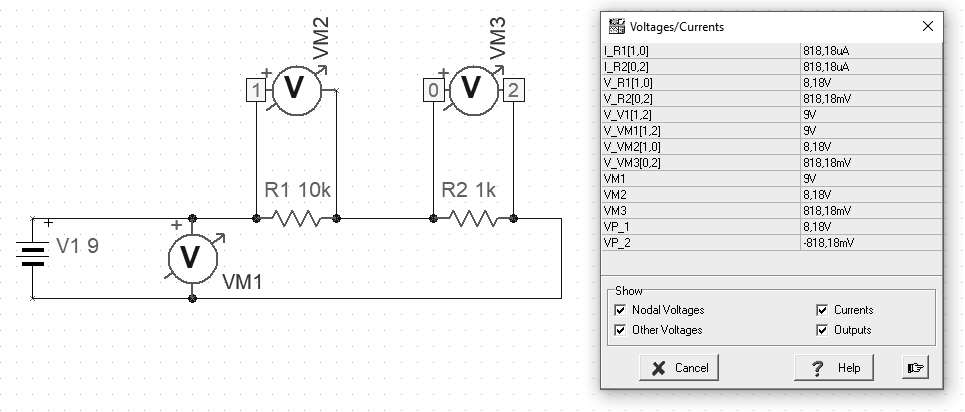
Another example is illustrated by Kirchhoff’s second law. An example shows the difference in the way the circuit elements are connected. By connecting the same voltage values ​​in parallel. By connecting the sum of voltage drops on individual elements, connecting to individual elements.

Fig. Second Law Kirchhoff (P05)

Gustav Robert Kirchhoff (born March 12, 1824 in Königsberg, died October 17, 1887 in Berlin) – a German physicist, creator of thermal radiation law regarding the relationship between emission and absorption capacity, and rights regarding electrical circuits (first and second law of Kirchhoff)” [W]

Examples available at https://github.com/michalasobczak/simple_hpc/tree/master/SeriesPartOne

Capacitor

Signal filtering

[202] Capacitors are divided into polarized and non-polarized depending on whether the direction of their inclusion in the circuit is important. Generally speaking, capacitors filter the waveform of the power source. It is assumed that the longer lead from the capacitor is the positive pole, which is sometimes reflected in the marking in the diagram. Electrolytic capacitors consist of a metal cover and an electrolyte lined with paper. Non-polar (non-polarized) capacitors can be made of ceramic elements or foil. There are also tantalum capacitors which both offer high capacitance and relatively low losses. The physical size of a capacitor depends not only on its capacity but also on its maximum operating voltage.

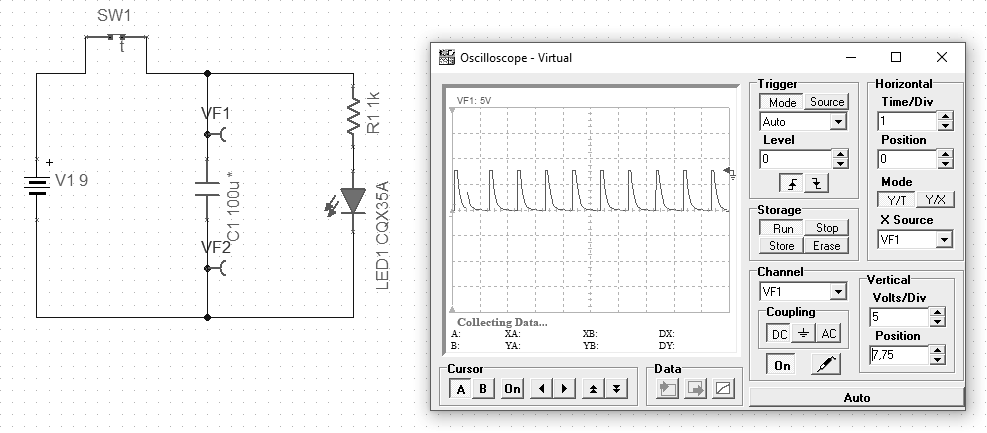
Fig. Capacitor in use with timer and LED (p07)


In the above example, we put a timer switch into the circuit, which in a 1 second cycle turns on for 100ms, causing the capacitor to charge. After the time specified by the parameters of the elements, the LED starts to emit light. When the switch disconnects charging, the capacitor discharges. The time of diode activation is controlled by determining the capacitance of the used capacitor.

However, the main task for capacitors is to filter the power supply. This treatment is used to protect sensitive components, e.g. a microcontroller in a digital circuit. It is most effective to use different types to filter the specific interference. Capacitors are connected to the circuit in parallel.

A capacitor is a device for the temporary storage of electric charge. What is believed to be the first capacitor was called the Leyden jar, which was invented by Pieter van Musschenbroek in 1746 at Leyden (or Leiden) University in the Netherlands. It was a glass jar wrapped inside and out with a thin metal foil. The outer foil was bonded with the ground, and the inner foil was connected to an electricity source, such as like an electrostatic generator. Though at that time, it was not understood how it worked, experimenters found that the Leiden jar seemed to store an electric charge even when unplugged from the generator. ” [206]

Examples available at https://github.com/michalasobczak/simple_hpc/tree/master/SeriesPartOne

growfs fsck required (pfSense)

In case you’ve managed to overcome other issues with system unable to boot, disk size not updated then there might be still one problem left. Sometimes resizing with gpart works fine but file system resize does not. I’ve encountered such issue and frankly speaking I’m not quite sure what is root cause of it. Is says that file system is dirty and I should run fsck which can be executed from console selecting number 5 and then F letter. System reboots and makes file system check. It says that the file system is fine, so it’s quite confusing.

Solution for this one is to boot the system in single user mode, by selecting number 5 and S. This skips few additional things normally executed during multi user boot mode. Now you can run the following to expand file system:

service growfs onestart

This command normally should be able to do its job, but this time, system should be run in single user mode to overcome it.

Azure FreeBSD (pfSense) not able to pick boot partition after disk resize

Following previous struggles on pfSense FreeBSD on Azure. After resizing disk Microsoft starts at some point adding an another drive which is temporary one. I do not need this by any means. It seems that NetGate pfSense template is also not quite compatible with cloud-init as the platform tries to execute systemctl which is not present here.

The problem with this is that FreeBSD will not be able to pick which partition it should start from. Fix for this is pretty simple. Just go and edit /etc/fstab and instead of pointing to some virtual labels. In my case it was /dev/da0s2a. You can pick the proper one during boot procedure by pressing question mark. Load will list for you all the partitions available. Try at your best. In mine case, it was the first one from the list.

What causes the problem? Being not compatible with cloud-init, NetGate template is vulnerable to unpredictable changes from my personal perspective. But here we are in public cloud environment and we should not be suprised by that.

Resize drive and partition on FreeBSD 12 (pfSense)

Recently I described how to increase drive, partition and filesystem on FreeBSD in Azure virtual machine. It turned out that this scenario was little bit different from a virtual machine running on top of VMware. First of all, with or without vm-tools I was not able to get updated drive size:

camcontrol rescan all

It gives messages that rescanning was successful, but actually it did not apply new values. However we can check new drive size with the following command:

camcontrol readcap da0 -h    # daX

If on your system you get same results, then you need to reboot.

There is also a difference of having swap space. First disable it:

cat /etc/fstab               # pick swap device to use
swapoff /dev/label/swap0     # as an example

Then remove swap partition as freebsd-ufs partition need to be a continuous space:

gpart delete -i 2 da0s1      # refer to gpart show 

Then as previously run resizing commands:

gpart resize -i X da0        # X would be probably 1
service growfs onestart

Now you are done.

WordPress migration

After 2 years on DigitalOcean I’ve decided to move out. Not because it’s bad or expensive, but because I need one more feature which is IDS/IPS. By default WordPress installation on DO contains fail2ban, which is fine, but I find Suricata way more powerful.

To start with, I’ve created a backup using All-In-One WP migration and Increate Max File Size. Former is responsible for dumping all of the site content, and the latter is giving a ability to upload this dump file into new WordPress installation.

But… you also need to edit one file in your need WP setup:

/etc/php/X.Y/apache2/php.ini

With the following:

post_max_size = 2048M
upload_max_filesize = 2048M

Then restart Apache, for instance:

sudo service apache2 restart

At plugin settings page select 2 GB. Migration plugin should be installed both on the source and target system. Before uploading dump file into new location be sure to check version if it’s the same as the source system. Then upload dump file and you should be all right with almost all the things. I’ve disabled and deleted all the plugins except for NextGen Gallery.

As I’ve been using all the backend things behind NGINX proxy, with WP it’s the same history. Nothing special should be considered here. Please remember to set Host, X-Real-IP, X-Forwarded-For and X-Original-Request headers in your configuration file. TLS configuration is managed on my NGINX by certbot so initially I give only configuration for port 80 and let it do the remaining.

On this particular migration scenario I’ve encountered one problem. There was HTTP 404 error message on all posts and categories. To overcome it go to Seetings.Permalinks and hit Save button. That’s all, maybe there is some issue with the backup tool.

MacPorts installation on 10.8.5

To bring and old MacBookPro up to date you can use MacPorts. First you should download and install MacPorts package from macports.org. There is a pkg file to use specifically for Mountain Lion. That’s the easy one. A little harder would be to grab working XCode with command line tools. You need to have Apple ID, not quite sure if there is different one to access developer.apple.com but mine works just fine.

Go and download XCode 5.1.1 and command line tools, file names are as follows:

MacPorts-2.7.2-10.8-MountainLion.dmg
Xcode_5.1.1.dmg
Command_Line_Tools_OS_X_Mountain_Lion_for_Xcode__April_2014.dmg

XCode requires accepting licence with the following command:

xcodebuild -licence

As you will install command line tools manually, then there is no need to go to XCode’s preferences – Downloads section. Still it would not probably work as Apple ID now requires 2FA which is not present in such and old operating system.

MacPorts itself require update:

sudo /opt/local/bin/port selfupdate

After that you can install various packages. Without updating you are going to have troubles installing things as there will be missing package dependencies. For instance, to install wget type:

sudo /opt/local/bin/port install wget