Logging all HTTP traffic is often unnecessary. It especially applies to website which include not only text content but also all kind of additional components, like JavaScripts, stylesheets, images, fonts etc. You can select what you would like to log inclusively, but it is much easier to do this by conditional negative selection. First define log format, then create conditional mapping, last thing is to specify logger with decision variable. For instance:
This way we are not going to log any of additional stuff and keep only regular pages in the log. Will be more useful for further traffic analysis than filtering out those things manually.
For non-users of either Proxmox or Suricata: the first one is virtualization appliance which helps firing up virtual machines as well as LXC containers and the latter is network traffic security system which is able to identify (IDS mode) or even block malicious traffic (IPS mode). Suricata works just fine on Proxmox which is usually installed on Debian Linux, but sometimes there are some hardware/software compatibility issues which I'm going to tell you about right now...
Having Proxmox server exposed in public space could be really not the best way possible. However if there is no chance for dedicated hardware, then hiding your box from the world is the only reasonable way. There is of course possibility to setup Proxmox cluster with only one server exposed and the rest being only thru private link (e.g. VLANs on vSwitch on Hetzner). But still you will be left with at least one server which needs to be accessible from outside.
Note: without dedicated networking hardware you can try setting up everything offline with KVM console (with private link only just for cluster communication), but this way if something goes wrong you will be left waiting in queue to access it as resources often are limited, just as they are on Hetzner. Usually KVM access is given within 15 – 60 minutes from request time.
So in case you have your box exposed you need to hide it somehow from malicious traffic. I prefer to disable RPC and SSH. Enable 2FA for UI authentication. And last one is to install Suricata IPS directly on Debian. Of course if you have some VM inside Proxmox (and you will have) you can install Suricata on them too, like on pfSense where it is conieniently prepackaged. Installation is straightforward but… it relies on Linux kernel features which need proper drivers and hardware compatibility. It means that you are going to have it running on almost all modern hardware but not on all of it. There are some issues with onboard NICs and Proxmox custom kernel picking up different drivers. Official documentation states that we should load nfnetlink_queue module but the most important thing on those problematic hardware is to enable and start nftables service. Without it, Suricata will pick af-packet mode, but we are interested in nfqueue mode as it supports blocking by default.
Suricata system service is configured to run in af-packet mode by default, you can check service system files. In case startup scripts recognize that there are overrides it will start in different mode, for instance in nfqueue mode. On problematic setups most probably you might need to customize it a little bit. And basically that’s all, but you are not going to read it anywhere in official documentation. So hopefully with these small things you will get big benefits.
Dzisiaj wyjątkowo będzie po polsku na temat ChatGPT. Zadałem sobie nieco trudu i wypróbowałem jego “możliwości” z zakresu programowania jako, że zasłyszałem o takiej opcji. Moim ulubionym w ostatnim czasie tematem jest OpenCL, zatem….
JA: to napisz mi kernel OpenCL który służy do sortowanie liczb zmiennoprzecinkowych
Dostałem sortowanie bąbelkowe…. i to jeszcze na floatach. W sumie to nie poprosiłem o double, więc nie mogę narzekać. Ale serio, sortowanie bąbelkowe, na GPU w OpenCL?
__kernel void sort(__global float *data, int length) {
    int i = get_global_id(0);
    int j = get_global_id(1);

    if (i < length && j < length) {
        if (data[i] > data[j]) {
            float temp = data[i];
            data[i] = data[j];
            data[j] = temp;
        }
    }
}
Konwersacja
Spróbowałem porozmawiać na ten temat z chatem tak aby dowiedzieć się dlaczego tak zaproponował oraz czy po kilku wskazówkach nie mógłby zrewidować swoich odpowiedzi na bardziej przystające do zadanego pytania:
JA: no ale przecież sortowanie w przestrzeni globalnej nie uda się ponieważ na GPU będą jednocześnie uruchomione pozostałe instancje tego kernela, co doprowadzi do nieprawidłowych wyników, twoja odpowedź jest nieprawidłowa, nie bieżesz pod uwagę kontekstu tego uruchomienia.
Chat: Przepraszam, to prawda. Sortowanie w przestrzeni globalnej jest nieprawidłowe, ponieważ wiele instancji tego jądra mogą być jednocześnie uruchamiane na GPU i może to prowadzić do nieprawidłowych wyników. W celu uniknięcia tego problemu należy użyć innego algorytmu sortowania, który umożliwia sortowanie w jednej instancji, lub rozbić sortowanie na wiele mniejszych sekwencji i sortować je oddzielnie.
JA: jaki zatem sugerujesz algorytm do sortowanie danych używając kernel OpenCL
Chat: Istnieje wiele algorytmów sortowania, które można użyć w kernelach OpenCL. Najbardziej popularne…
No i zamiast dostać propozycję pod OpenCL, dostałem ogólną odpowiedź z podręcznika o algorytmach nieprzystosowanych do programowania współbieżnego.
JA: moim zdaniem to błędna odpowiedź ponieważ będzie to sortowanie bitoniczne i pozycyjne oraz ewentualnie sortowanie z przesunięciem
Chat: Sortowanie bitoniczne i pozycyjne to popularne algorytmy sortowania używane w OpenCL. Sortowanie z przesunięciem jest mniej popularne, ale może być używane w niektórych sytuacjach. Wszystko zależy od wymagań i wymagań danego zastosowania.
JA: to napisz mi proszę przykład kernela OpenCL dla sortowania z przesunięciem.
No i dostałem co prawda, coś co przypomina shift-sort ale z globalną barierą.
__kernel void shiftSort(__global float *inputArray, int arrayLength) {
    int globalId = get_global_id(0);
    int stride = 1;

    while (stride < arrayLength) {
        int index = globalId * stride * 2;

        if (index + stride < arrayLength) {
            if (inputArray[index] > inputArray[index + stride]) {
                float temp = inputArray[index];
                inputArray[index] = inputArray[index + stride];
                inputArray[index + stride] = temp;
            }
        }

        stride *= 2;
        barrier(CLK_GLOBAL_MEM_FENCE);
    }
}
JA: dlaczego założyłeś barierę na pamięć globalną?
Chat: Bariera na pamięć globalną jest zastosowana w powyższym kernel OpenCL, aby zapewnić synchronizację między wszystkimi wątkami. W trakcie sortowania z przesunięciem każdy wątek sortuje swoją część danych wejściowych i jednocześnie jest uzależniony od wyniku sortowania wątków z innych części danych. Bariera na pamięć globalną gwarantuje, że wszystkie wątki zakończą sortowanie swoich danych i będą gotowe do następnego kroku sortowania, zanim sortowanie zostanie kontynuowane. To zapewnia poprawność wyniku sortowania i unika problemów związanych z nieprawidłowym dostępem do pamięci.
JA: a czy przypadkiem bariera globalna nie dotyczy wyłącznie pojedynczej grupy roboczej z N wątków?
Chat: Tak, bariera globalna działa na pojedynczej grupie roboczej i synchronizuje wątki w tej grupie, ale nie wpływa na inne grupy robocze w tym samym kernelu. W OpenCL, bariery na pamięć globalną służą do synchronizacji wątków w grupie roboczej i zapobiegają race conditions, gdy wiele wątków dostępuje i modyfikuje te same dane.
Wnioski
No i tutaj skończyła się przygoda z tym programem, bowiem próby doprecyzowania czegokolwiek powodowały albo błąd albo te same odpowiedzi. Podsumowując fakty mamy tutaj bardzo sprawne narzędzie, które zostało nakarmione mnóstwem informacji, nawet ciężko mi sobie wyobrazić jakie to są ilości. Wiedza tego mechanizmu kończy się na 2021 roku i nie ma podłączenia bieżącego do internetu. Zapytane czy używa CUDA do swojej pracy odpowiedziało twierdząco.
Tak szybkie działanie modelu wymaga ogromych ilości pamięci operacyjnej i bardzo dużej ilości rdzeni obliczeniowych aby procesować wejście i generować odpowiedzi. Brzmi to jak gigantyczna infrastruktura oparta o system rozproszony i tysiące kart GPU przetwarzające całość tego wsadu. Pytanie kiedy zacznie był płatne, czy jak zacznie dobrze odpowiadać czy jak ludzie się od tego uzależnią?
First of all this SSD drive which I use is somehow faulty. It is a Goodram SSDPR-CX400-01T-G2 drive of 1TB. It have been working fine for few weeks until some construction worker made a electric short causing some abnormal frequences in wires resulting a faulty drives and memory sticks. One of victim was this drive:
in CrystalDisk it is reports as good,
but in Ubuntu disks utility it supposedly has 1 bad block
badblocks -svt 0x00 /dev/sdX shows no bad blocks
zeroing with dd and veryfing with cmp is fine
This drives for sure has some issues as at least one of tools shows that it as a problematic badblocks. Second of all in regular use it fails to run VM. It once switched into read-only mode in VM filesystem then after formatting it it refused to restore VM from backup. So last thing in which it might be useful is being storage for swap:
mkswap -c /dev/sdX
swapon /dev/sdX
Then in /etc/fstab:
/dev/sdX none swap sw
I set it in VM as 256 GB drive, why? Because I encountered some leaking Ruby libraries in my project and program required way more memory than it should have actually require, so the temporary solution is to increase available memory by adding such a huge amount of swap.
Having your own mail server could be useful but also sometimes dangereous. I am happy to see appliance such as iRedMail which cover variaty of topics regarding a somehow complete solution. I pick Ubuntu 22 on Hetzner. First you create DNS A record for your mail server and following by this a MX record pointing at that A record. Be sure to set proper hostname in the system. You can check it with:
hostname -f
Ensure you have it set also in /etc/hosts and /etc/hostname. Next download iRedMail installer and iRedMail.sh script. It will prompt for various things but in my case I was missing dialout package, so be sure to install it before running installation. I choose PostgreSQL and NGINX backends as I am more aware of them than MariaDB and Apache. Once the installer finishes it is required to reboot your system to apply all the settings.
Administration panel is available at mail.yourdomain.ext/iredadmin. Webmail at mail.yourdomain.ext/mail. Now if all went fine you will be able to create additional user accounts and send messages to your mailboxes. However you will not be able to send it to external mail servers such as Gmail because you lack of security and antispam configuration on your DNS side. So…
To setup SPIF create TXT DNS entry saying which IP addresses are eligable to send messages from. If you do not care that much, then create record allowing any server to send:
yourdomain.ext. 3600 IN TXT "v=spf1 mx -all"
This is however not enough for several mail providers and you need to setup also DKIM record. It utilizes digital signature using public key. Not to going too much deep into the topic setting it up is also quire easy:
amavisd showkeys
Grab command output and create another DNS TXT entry:
v=DKIM1; p=verylongkeystringwithoutquotes
So with these two DNS mail server verification features you will be able to send messages to external servers without them complaining about your setup. iRedMail documentation explains both basic installation and this DNS confguration quite nice so be sure to check it out also.
Until recently I though that having DNS subdomain entries provides enough obscurity thus should it be secure. If your DNS server does not offer transfering domain to another place then any subdomains should be hidden from public sight. Transfers, if enabled (or rather misconfigured) could be made by:
dig -t axfr example.com
Second thing is querying for ANY option, but it does not mean “all”:
dig example.com any
So, with disabled transfers and lack of exactly private entries while quering for any, you would think that you are on a safe side. And that is actually wrong. There are two 3 options on a table:
Someone run crawler and scrap websites for domain names, possibly there are plenty of such systems as I see them quite often in HTTP server logs
Someone hacked your network perimeter and changed your DNS addresses for their own, this affects all the clients connected to such network if you would be able to force such traffic. This is of course a malicious and intrusive procedure, not happening on every day manner.
You are using public/private/provider DNS server and it is saving your requests building a database. Of course it could be either DNS forwarder or resolver or any in DNS query chain with similar configuration.
As far as I know for the most of domains there is no possibility of transfering or exposing too much with “any”. Not every domain was ever present on any other website so it could have been automatically crawled. Is everyone hacked or the most popular public DNS server are involved in building domains list database? There are plenty of subdomains or even domains that are way too complicated to be guessed. I do not think that those information leak from domain registrars but there is a chance.
So there is this domainsproject.org. They say that they use crawling and DNS checks, but I do not bother even to check their code as it seems to be fugazi (fake). How on earth could they check for some random text put in subdomains. It is for sure coming from DNS queries that should stay at those servers safe. Fortunately it does not include every subdomain configured.
Today thinking should be changed a little bit. If you put something on the internet then it is not safe or hidden by default. Maybe I just assumed too naively, and took for granted that people running public DNS servers share the feeling about privacy things as myself.
I’ve been playing around with several devices in a context of running OpenCL code on them. They have one common thing which is excessive heat coming out of GPU and heatsink being unable to dissipate it. I start with MacBookPro3,1. It has NVIDIA 8600M GT, which is known to fail. I assume that it may be linked with overheating. Second example is design failure of Lenovo Thinkpad T420s which has built in NVIDIA NVS 4200M. This laptop has Optimus feature which in theory could detect if workload should be run on discrete or integrated GPU. Unfortunately enabling either Optimus or run-only-on discrete GPU causes extreme overheating up to 100 degress Celcius which makes this setup unusable (it slows down). Last example would be Lenovo Thinkpad T61 with NVS 140M. Contrary to previous examples, this one shows no issues with overheating itself, but is extremely fragile in terms of build quality. CPU has proper heatsink contact by means of 4 screws, but for unknown reason GPU which is 2 cm aside lacks of any screws and is dependent on separate metal clip which puts pressure on heatsink and has its own screw. I find it quite silly, because in case of thermal paste going bad or having loose this one screw it may completely damage GPU. Unscrewing just a little bit this one screw and temperature goes from 50 to 100 degrees risking fire I think….
So, back in a days when manufacturers tried to put dedicated GPU in compact laptops there were several examples of design flaws especially lacking proper heatsink and fans. Nowadays when discrete graphics are way more common on the market it is not uncommon to see several fans and huge blocks of metal giving away all this heat coming out from case because you run game or try to compute something in OpenCL.
Among various computing devices I have there is one that stands out it is NVIDIA Quadro NVS 140M because it supports only FP32 (float) operations, but not FP64 (double). It is generally too old. In OpenCL we have both pow function which takes double and float parameters. The latter is called pown. I use first one to actually benchmark double precision computation.
Model
Year
Core
Unit
Clk
Perf
1k
10k
100k
NVS 4200M
2011
48
1
1480
156/12
13
116
1163
Tesla K20xm
2012
2688
14
732
3935/1312
2
3
24
Intel i7 2640M
2011
2
4
2800
n/a
3
27
281
RTX 3050 Ti Mobile
2021
2560
20
1695
5299/83
2
10
90
Intel UHD 10200H
2020
192
12
1050
422/?
4
19
192
NVS 140M (FP32)
2007
16
2
800
25/-
47
445
4453
The fastest in this comparison is Tesla K20xm which I find a little surprising because it is from 2012 and it wins over RTX 3050 Ti Mobile from 2021. However if we take into consideration that FP64 performance of Tesla is 15 times greater (only 4 x in actual time) than RTX then it should be obvious why it wins.
I have no need to use double to be honest (integer should be just fine here), but it is a great chance to see performance differences between various devices. Using FP32 would be quite difficult to get such a broad range of timings. Using pown(float, integer) changes above table a little bit as we start using FP32 computations (at 100k elements):
Tesla K20xm: 12ms
RTX 3050 Ti Mobile: 3ms
NVS 4200m: 352ms
NVS140M: 4453ms
Now I look at those timings from theoretical performance measured in GFLOPS. Comparing NVS 4200M and NVS 140M we have relation of approx. 6 times (156 vs 25), but timing relation is only just close to 4. So other factors come to play here also. Comparing RTX 3050 Ti and Tesla K20xm we have 1.34 (5299 vs 3935), but timing relation is 4. So actual performance gain is much higher than I would expect comparing GFLOPS measurements.
Getting Tesla K20xm is a steal in terms of FP64 computations as it is on similar level as RTX 4090.
You can put your #GPU in #Proxmox server box and pass thru computational power to virtual machines… just in case you would like to run your AI/ML things alongside your virtualized NAS 😀
Finally I got it working. I think so. This Proxmox installation is simple one, just single node for experiments which is half part. The other part is VM configuration. You may ask, what exactly for do I need GPU in VM? I may need because the hardware is capable of running several additional GPUs and I can use all of them at once in different configurations and even in different operation systems. Just like people do in cloud environments and this setup mimics such thing running server-like computer with datacenter-like GPUs on board. During this test I used NVIDIA GTX 650 Ti which is consumer grade card, but now I confirm to have it working so I will put there my other cards, like NVIDIA Tesla K20xm or FX 5800 with lot more shaders/cores which can be used in OpenCL applications for AI/ML. And you will see how easy is to cross the temperature maximum of a GPU.
I have Intel Xeon E5645 so in my options I put intel_iommu. In case you have AMD or something else, then it should be adjusted. Blacklisting modules, I prefer to keep all of these as you may want to put different cards in your setup. Without this, Debian (on which Proxmox is run atop) will try to load modules/drivers and put your black console screen in higher resolution. If you blacklist these modules, then you will get low resolution output. That is want you should see here at this moment. Totally variable part is vfio-pci.ids (which can be obtained using lspci command). First one is for video adapter and the second one is for audio device. I put both however I will for sure use only the first one.
Other configurations
Second thing to modify:
root@lab:~# cat /etc/modprobe.d/blacklist.conf
blacklist nouveau
blacklist nvidia
Same here, I think that you can have it either here or in GRUB section.
Then, the modules list which should be enabled:
root@lab:~# cat /etc/modules
# /etc/modules: kernel modules to load at boot time.
#
# This file contains the names of kernel modules that should be loaded
# at boot time, one per line. Lines beginning with "#" are ignored.
vfio
vfio_iommu_type1
vfio_pci
vfio_virqfd
Next thing is to apply GRUB options with either of those commands:
update-grub
proxmox-boot-tool refresh
I am little confused as the official documentation (found here) states that you should do the first one, but actually running this command tells us that we should run the second one intead.
To verify it all of above changed anything at all, reboot your system and then:
dmesg | grep -e DMAR -e IOMMU
If you see message saying “IOMMU enabled” then you are good to go further, otherwise some different configuration should be applied. In my case I got some issue saying that my Intel chipset is unstable with IOMMU remapping so the thing is going to be disabled. So there is need to have this “allow_unsafe_interrupts” option I guess. To verify if you have working IOMMU groups:
find /sys/kernel/iommu_groups/ -type l
You should see some entries here.
Virtual Machine
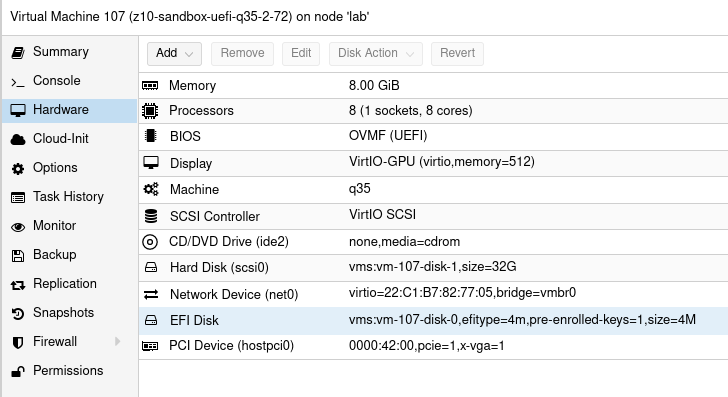
This time I tried 3 VM configurations which is Ubuntu 20 LTS Desktop. There are two main factors you should consider. Different variations may work but it is not fully predictable as you take multiple factors into consideration.
Q35 & UEFI
First one is to use Q35 instead of i440fx. This way you should be able to use PCI-E. I tried it on i440fx and it shows GPU but it is not accessible. Verification process involves the following:
clinfo showing positive number of platforms
nvidia-smi showing process list using dedicated GPU
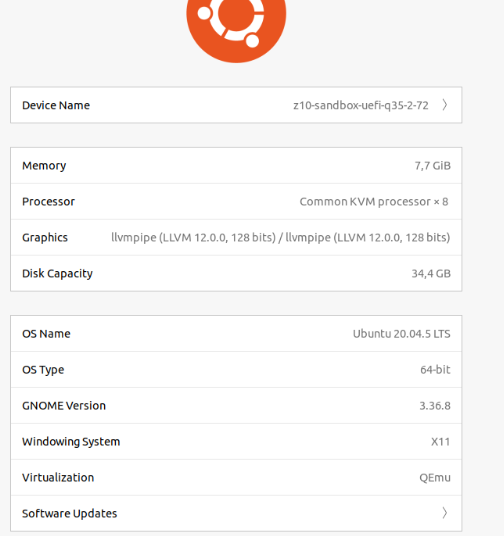
Ubuntu about page saying that we use particular NVIDIA driver (however it is debatable…)
Second thing is using UEFI instead of default BIOS setup, but it requires you to check if your GPU actually supports UEFI. So I tried Q35 and UEFI and this combination allows us to have all of these somehow working. Regarding UEFI I disabled secure boot in VM UEFI/BIOS.
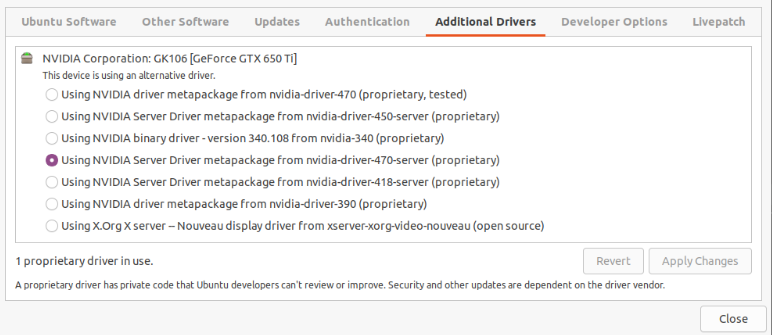
Concerning the driver (NVIDIA in my case) I use nvidia-driver-470-server but other also seems to work. It is weird that Ubuntu about page shows llvmpipe instead of this driver, but the drivers page says that the system uses NVIDIA driver. Not sure who is right here.
The drivers list:
Device resetting
The last thing which prevents this setup from working is to “remove” the devices at boot time (/root/fix_gpu_pass.sh):
Where ID is PCI-E device ID at VM level which can be checked using lspci -n command. Add it to crontab at reboot time (crontab -e):
@reboot /root/fix_gpu_pass.sh
OpenCL verification
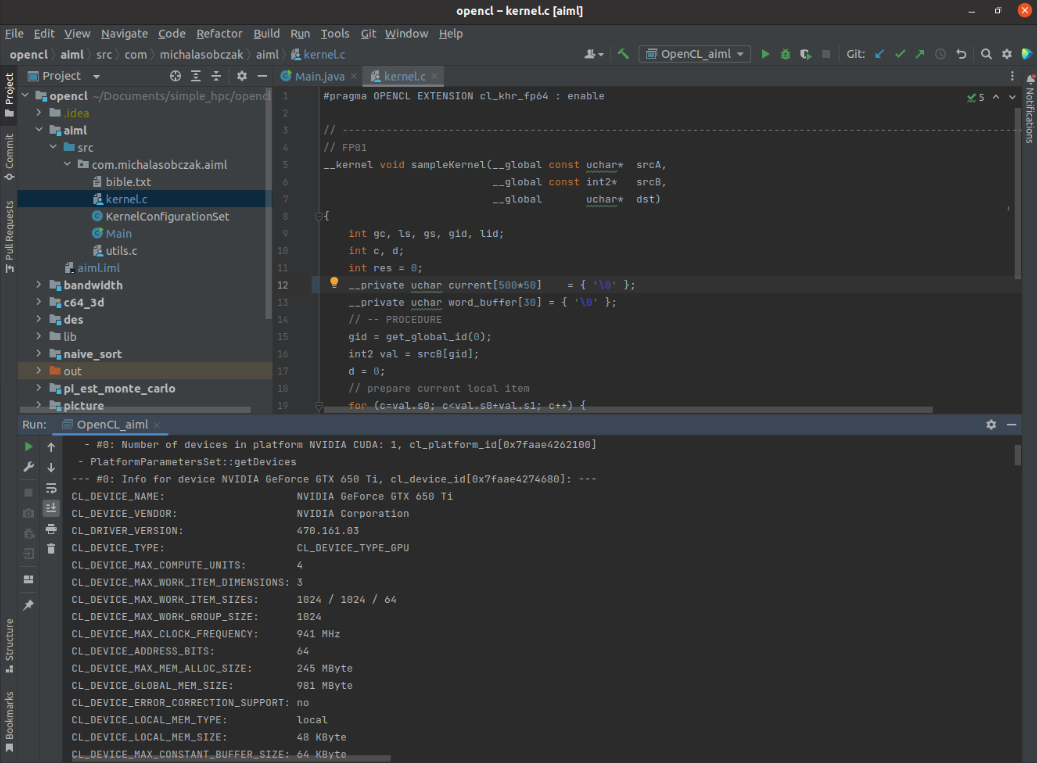
So, if you can see VNC console in Proxmox, your VM is booting and you are able to login, you can install driver, lspci/nvidia-smi/clinfo show proper values then it is now time for a grand last check which is to clone Git repository with my code and try to run it.
cd ~/Documents
git clone https://github.com/michalasobczak/simple_hpc
Then install openjdk-19 and create Application configuration for aiml module having opencl module in your classpath. You may require to rebuild opencl module also. Finally if you are able to see platforms here then you are in the correct place.
I have NVIDIA GeForce GTX 650 Ti placed in my HP z800 as a secondary GPU and the system recognizesit properly and the code runs well. Performance wise I should say that it seems to be fine. I quickly compared NVS 4200M with this card:
NVS 4200M (CL2.0 configuration profile): 30 – 40 ms
GTX 650 Ti (CL3.0 configuration profile): 4 – 5 ms
There is one culprit regarding diagnostics as nvidia-smi does not show GPU utilization and process list, but it shows memory consumption. Increasing local variables size (arrays) has direct relation on memory utilization increase that is why I assume it still works somehow! Maybe even not that bad.
Burning Tesla K20xm
As mentioned earlier after successful setup with consumer GPU it is now time to try a datacenter one. I have this Tesla K20xm which is quite powerful even in today standard. It has plenty of memory (6GB) and tons of cores (2688), even more than my RTX 3050 Ti (2560). Of cource being a previous generation hardware it will be less efficient and will drain more power. And there it is the problem. This GPU can draw up to 235W. I have over 1000W power supply but there is certain limitation on PCI-E gen 2 power output. So the maximum I’ve seen on this GPU during passtru tests was 135W. After few minutes temperature rises from 70 up to 100 degrees Celcius cauing system to switch it off… running nvidia-smi gives me such a error message, asking me nicely to reboot:
So there it is, I forgot totally that this GPU belongs to proper server case with extremely loud fans which I lack actually in PCI-e area in HP z800. This computer has plenty of various fans, even on memory modules, but this area is not covered at all. After computer reboot GPU comes back to life. Besides the problem with the temperature itself, there is efficiency drop after cross somewhere near 90 degrees, it slows down few times and near 100 degress is switches off completely.