You can use OpenStreetMaps on your own hardware. You need to grab map files first, which can be found at https://download.geofabrik.de. Once you downloaded it, install PostgreSQL and enable few extensions:
It may be useful at some point later on especially if you would like to try build your own tile server. Next you need to install osm2pgsql and it can be found in system packages in Ubuntu 22. Then:
Now give it database password and it will start loading. Depening on hardware it might take from few minutes to tens of hours in case of large files like Europe area. You should have something like this:
These are tables with points, lines, polygons and roads. Most of the data is located in the PBF file itself, but few other are calculated on the fly while loading. There is plenty of options for such data. You can use them in some desktop software like QGIS (loading directly PBF file) or setting up complete tile server similar as on the official OSM website.
Data is valuable if consumed or at least identified. For private and corporate usages I suggest installing Redash as it gives options for saving queries, exporting data, creating visualizations and dashboards and also setting up alerts. There are few other interesting features like creating dropdowns and inputs from saved queries or joining resuls from different data sources thru in-memory SQLite instance.
To install Redash, clone the repository. I recommend running Ubuntu 18 LTS server version as it is tested on this distribution. Then chmod a setup.sh file for execution and run it. It will ask for sudo password and going to install all the required things like packges and containers. It is based on Docker so in case of production setup better tweak it a little bit for volumes at least.
That’s all, your Redash should be instantly available to use.
As already stated in my year 2023 plans, there will be some time for graphics programming. Back in the days I was exploring OpenGL but that was way long ago. Nowadays I think to try something much simpler and accessible like for instance WebGL. This library relies on JavaScript for logic and OpenGL ES for presentation layer. So it is hardware accelerated.
But there are some issues with this acceleration. On some computers you can specifically select particular GPU in BIOS/UEFI. However not on every computer. To start with I tried on Lenovo ThinkPad T420s with NVIDIA NVS 4200M. Testing on aquarium demo (which can be found here) I get stable 37 FPS on 5k elements with somewhere around 95 – 99% of load. There is sometimes some performance degradation when FPS count goes as low as 10. GPU and CPU temperature show the same value of 95 degress C. That is way too much. This computer has great advantage over others because it has NVIDIA Optimus feature which gives be ability to switch between graphics chips or let harware to choose itself which GPU should be used at the moment.
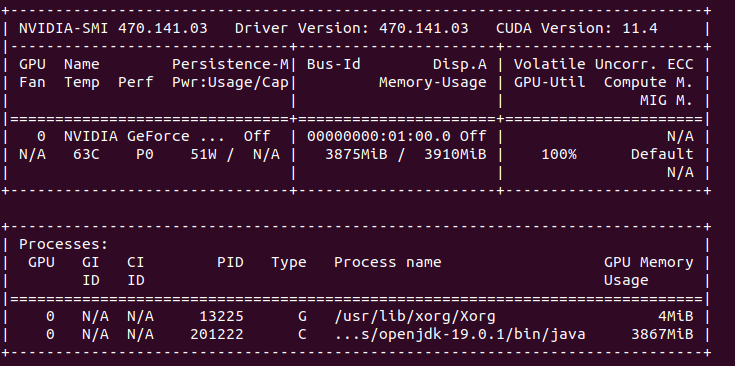
My other machine, which is Dell G15 lack such a feature and Ubuntu 22 picks integrated Intel UHD 10th gen GPU instead of heavy NVIDIA GeForce RTX 3050 Ti. So on this integrated chip we have stable 45 FPS, but without any performance drops. I am able to run Firefox browser on “discrete graphics” because I have this proprietary driver but it gives me only 50 FPS, so only 5 more than integrated one. It shows only 30% load on nvidia-smi so it is not doing that much. I tell you even more, on 30k elements there is more FPS on integrated GPU (20 vs 15). I do not quite get it what is going on here.
I still test it on various other harware configurations and it gives more weird unexpecting results.
I’m looking forward for new year’s technology opportunities. I have few ongoing projects which I would like to finish by the end of this year. Here is some brief overview of them:
Data Mining chapter of Simple HPC series
News feed tool as a subproject for data mining
AI/ML project utilizing news feed, OpenCL processing and user-input training
Highly portable system monitoring tool for my day-shift
Video graphics… most probably WebGL/THREE.js
I will try to fit all of these within just around 300 hours available…
OpenCL is excellent in the field of numbers, but not that much into text processing. It lacks even basic functions available in regular C99. So the question is if it is worth trying to process some text in it.
In my OpenCL base project (which can be found here) I’ve added “aiml” module. It loads over 31k lines of text with over 4 mln characters. The text itself is in the first buffer of uchar array. Second buffer holds pointers and lenghts of consecutive lines being work-items, so there are over 31k of such work-items. Third buffer is a result array when I can store a outcome of kernel processing.
Java base code
First read text file and generate pointers and lenghts:
    public void readFile() {
        System.out.println(" - Read file");
        File file = new File("aiml/src/com/michalasobczak/aiml/bible.txt");
        try {
            BufferedReader br = new BufferedReader(new FileReader(file));
            String st = null;
            while ((st = br.readLine()) != null) {
                allstring.append(st);
                vector.add(st);
                line_sizes.add(pointer);
                pointer = pointer + st.length();
                counter++;
            }
        } catch (IOException e) {
            throw new RuntimeException(e);
        }
        System.out.println("Read no of lines: " + counter);
        System.out.println("sample line: " + vector.get(100));
        System.out.println("sample line size in chars: " + line_sizes.get(5));
        n = counter;
    }
And then copy source text, pointers and lenghts to thebuffers:
As I have already mentioned, OpenCL C99 lacks of several basic text processing features. I think that is because it is not meant to be used with texts and secondly because you cannot do recursion and I suspect that some of those functions might use it. So I decided to prepare some basic functions as follows:
#define MAX_STRING_SIZE 256

int get_string_size(uchar string[]) {
    int size;
    int c;
    int counter = 0;
    for (c=0; c<MAX_STRING_SIZE; c++) {
        if (string[c] == NULL) {
            break;
        }
        counter++;
    }
    return counter;
}


void print_string(uchar stringa[]) {
    int size = get_string_size(stringa);
    int c;
    for (c=0; c<size; c++) {
        printf("%c", stringa[c]);
    }
    printf("\n");
}


void set_string(uchar wb[], uchar tmp[]) {
    int c;
    int size = get_string_size(tmp);
    for (c=0; c<size; c++) {
        wb[c] = tmp[c];
    }
}

void set_string_and_print(uchar wb[], uchar tmp[]) {
    set_string(wb, tmp);
    print_string(wb);
}

int find_string_in_string(uchar source[], uchar looking_for[]) {
    int s_size = get_string_size(source);
    int lf_size = get_string_size(looking_for);
    int c, d;
    for (c=0; c<s_size; c++) {
        for (d=0; d<lf_size; d++) {
            if (source[c+d] == looking_for[d]) {
                ;
            }
            else {
                break;
            }
            if (d == lf_size-1) {
                return 1;
            }
        }
    }
    return 0;
}
Few words of explanation. String size function relies on NULL terminated characters array. String setter function does not puts that NULL in the end, so you need to do it yourself if needed. Finding string in string returns only first hit.
Now, the kernel:
__kernel void sampleKernel(__global const uchar* srcA,
                           __global const int2*   srcB,
                           __global       uchar*  dst)
{
    int gc, ls, gs, gid, lid;
    int c, d;
    int res = 0;
    __private uchar current[131*1000]    = { '\0' };
    __private uchar word_buffer[30] = { '\0' };
    // -- PROCEDURE
    gid = get_global_id(0);
    int2 val = srcB[gid];
    d = 0;
    // prepare current local item
    for (c=val.s0; c<val.s0+val.s1; c++) {
        current[d] = srcA[c];
        d++;
    } // for
    uchar tmp[10] = "LORD\0";
    set_string(word_buffer, tmp);
    res = find_string_in_string(current, word_buffer);
    dst[gid] = res;
} // kernel
As shown before in Java base code, there are 3 buffers. First one is for plain uchar array of source text. Second one is for int2 vectors holding pointers and lenghts of consecutive, adjacent lines/verses. Third is for output data, for instance in case of successful search it holds 1, otherwise 0.
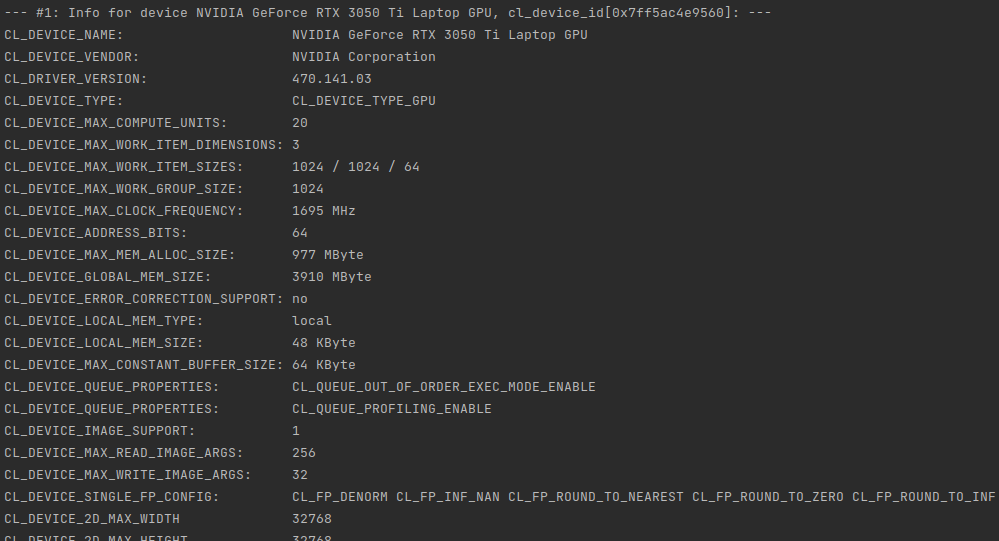
I’ve tested this on my NVIDIA GeForce RTX 3050 Ti Mobile with 4 GB of VRAM. Having around 32k elements (work-items) means that we can allocate as much as 131kB of data per single work-item. This way we can fully load all available VRAM memory. Of source not all of given work-items will be run at the same time because there is only 2560 cores in this GPU. So obiously it is the maximum parallel items working at the “same time”. Estimated 13 rounds is required to process all the data, however we need to keep in mind that local-size is set to 32 and there are some specific constraints put on the GPU itself by CC (compute capabilities) specifications.
For CC 8.6 we have maximum of 16 thread blocks per SM (streaming multiprocessor) times 32 work-items of local-work-size it gives us 512 max. RTX 3050 Ti has 20 SM, so the maximum simultaneous (in theory) working items would be 10240, but having only 2560 cores I think that of course it will not reach that far having 100% utilization at much lower values. Still for the latest GPUs, they can have up to 16k cores, so that kind of hardware could better utilize CC 8.6 of higher specification on full load.
I would like to point out one more things regarding private/register memory and a global memory. In case of Ampere GPU architecture:
The register file size is 64K 32-bit registers per SM.
The maximum number of registers per thread is 255.
So, we are limited per work-item to 255 registers and there is also a 64k limit per SM. We can thus estimate or even calculate the maximum data size which will fit locally and beyond that value it will go outside to global memory providing much higher latency. It can be seen on times calculation increasing while we increase uchar current array.
Conclusion
Text processing in OpenCL works just fine with 0 – 1 ms per single search thru over 4 mln characters (31-32k lines). We are constrained by lack of string or memory functions so all string function I’ve made use constant array buffers. I’ve practically tested full VRAM allocation (4GB). Power draw is 51W.
What next? I think that may take step forward and try to do come classification and few other things toward ML or even AI. That can be quite interesting to see…
OpenCL implementation od DES cipher is way faster than regular single-threaded C program. 1 mln encryptions take less than a second on RTX 3050 Ti, but also as much as almost 40 seconds on Intel i5-10200h single-thread application.
Lack of compact and extremely portable SSL/TLS library in pre C++11 project made me think about going for something easy to implement on my own concerning data encryption. I’ve selected DES, which stands for Data Encryption Standard because of my general understanding of such algorithm. It comes from 1975 and has certain limitations including short key length or known weak keys. But if we put our prejudices aside we may see few interesting things and opportunities as well.
It took me several days to accomplish C99 kernel in OpenCL. Before this I tried few third party examples in c++. One major drawback is that all of them use strings, vectors, stringstreams and few other strictly c++ features. Even use of printf is problematic in OpenCL implementations as you may not get it or it may be working differently from implementation to implementation. You will not be able to use some of c99 features like malloc/free. So to get maximum compatibility I went down to the simplest solutions.
I especially admire example in which you use binary as strings (uchar arrays). This way you can easily see what is going on. Of course (really?) it adds complexity and increases instructions count as well as memory consumption but for the first DES implementation it is acceptable. So you will see in various places arrays of 8 byte elements meaning 64 bits of data. Keys and other values as 56 or 48 bits of data and finally halves as 32 bits values (4 byte digits). Both input and output can be displayed as characters. Input will be plain ASCII, but output come over 128 decimal ASCII code so you can see some weird characters in case of printing them instead of presenting only numbers.
OpenCL vs single threaded C
In order to run kernel code outside OpenCL runtime you need to provide few things:
You need to add math library in GCC invocation because by default it is not included:
gcc des.c -lm
Then, kernel main function need to be adjusted, for instance as:
void kernel() {
  // here we have the kernel function body...
}
And finally provide C language main function with iterations already parametrized:
int main() {
    int i;
	for (i=0; i<1024*1024; i++) {
		if (i % 1024 == 0) {
			printf("i: %i ", i);
		}
		kernel();
	}
}
For sake of simplicity I skip uchar8 definition and handling as it do not add than much to overall complexity of the code and the algorithm. Running on different hardware with 1024*1024 iterations. First going to compare CPU execution time:
Hardware
Duration
Dell G15: Intel Core i5 10200H 2.4 GHz
38s
MacBookPro3,1: Intel Core 2 Duo 2.2 GHz
1min 37s
PowerBook G4: PowerPC G4 800 MHz
11 min 22s
Now compare it with OpenCL runtime duration:
Hardware
Cores No
Compute Units (acc. to OpenCL)
Duration
NVIDIA GeForce RTX 3050 Ti Mobile
2560
20
930ms
Intel UHD 10th gen
192
12
2065ms
Java base project
I use OpenCL base project which can be found here. There is one additional module called “des”. Originally I used Java 17, but today I select Java 19. Frankly speaking I cannot point out easily anything that much important between Java 11 and 19. Each version introduces either small language changes or no changes at all. But if you code complex object-oriented applications then those changes might be interesting for you.
So… first I fill source data table with the following function:
    public void generateSampleRandomData() {
        Random rd = new Random();
        for (int i = 0; i <= (n*8) - 1; i++) {
            byte c = (byte)('a' + rd.nextInt(10));
            srcArrayA[i] = c;
        }
    }
This function generates n*8 byte elements within a range of ASCII ‘a’ letter decimal representation and 10 numbers ahead. In other words random characters will be within range from ‘a’ do ‘j’ which in decimal will be from 97 to 106. One word about byte type in Java language – it is always signed so there is direct possibility to use it as unsigned. There is however Byte.toUnsignedInt function which translates negative byte numbers into positives.
Next thing is buffer. As later we will see that kernel function utilizes uchar8 data type, there is need to map such type in Java. I came with idea of using plain byte array (byte[]). Each and every kernel invocation will map consecutive groups of 8 elements from this plain array:
   public void createBuffers() {
        // Allocate the memory objects for the input- and output data
        this.memObjects[0] = clCreateBuffer(this.context, CL_MEM_READ_ONLY | CL_MEM_COPY_HOST_PTR, (long) Sizeof.cl_uchar8 * this.n, KernelConfigurationSet.srcA, null);
        this.memObjects[1] = clCreateBuffer(this.context, CL_MEM_READ_WRITE, (long) Sizeof.cl_uchar8 * this.n, null, null);
    }
Both source and target arrays are type cl_uchar8 which translate into uchar8 in the kernel itself. To print results coming back from kernel invocations we will use aforemendtioned Byte.toUnsignedInt function:
public void printResults() {
        System.out.println("Elements: " + dstArray.length);
        int i = 0;
        for (byte tmp : dstArray) {
            System.out.println(String.valueOf(i) + " : " + (Byte.toUnsignedInt(tmp)) );
            i++;
        }
}
And that is basically all regarding Java part of this challange. Use of Java here is a matter of covenience as you may do it also using c or c++. I do not know by now about any discrepancies in JOCL library and some other libraries available.
OpenCL 1.1
In order to run kernel code on some older devices you need to adjust few things. First you need to get rid of printf function invocations or define it by yourself. Second things you need to enable floating point cl_khr_fp64extension in case of using double type:
#pragma OPENCL EXTENSION cl_khr_fp64 : enable
There are options no to use pow function and convert the entire cipher algorithm to use bit selection. For my educational purposes however it is much easier to see what’s going on like that.
C99 kernel
I’ve divided the DES cipher algorithm into 27 functional points from FP00 to FP26. Some of them contains data only and other ones consists procedures.
General section
FP00 – auxilliary functions (lines 1-133)
FP01 – kernel definition
FP02 – data and identification
FP03 – key
FP04 – plain text
FP05 – PC1/PC2 tables data
Generating keys
FP06 – PC1 key permutation
FP07 – key division into two equal halves
FP08 – 16 round keys, for 1, 2, 9 and 16 single left shifts
FP09 – for other iteration double left shifts
FP10 – combining left and right parts
FP11 – PC2 key permutation
Encryption procedure
FP12 – data only, initial permutation and expansion table data
FP13 – data only, substitution boxes 8 boxes, 4 rows, 16 colums each
FP14 – data only, permutation table
FP15 – applying initial permutation
FP16 – dividing result into two equal halves
FP17 – encrypting 16 times, right laft is expanded
FP18 – result XORed with key
FP19 – apply 8 times substitution boxes
FP20 – applying permutation
FP21 – result XORed with left half
FP22 – left and right part of plain text swapped
FP23 – combining left and right part
FP24 – applying inverse permutation
FP25 – preparing final result
FP26 – writing result to the output OpenCL buffer
Summary
In this challange… which source code can be found here I verified possibility to code DES cipher algorithm using OpenCL enabled devices. This 500 lines of code can be run either on OpenCL device or in slightly modified form on any other devices with can compile C language. OpenCL implementation runs 40 times faster on GPU than on single threaded CPU. This was kinda interesing one…
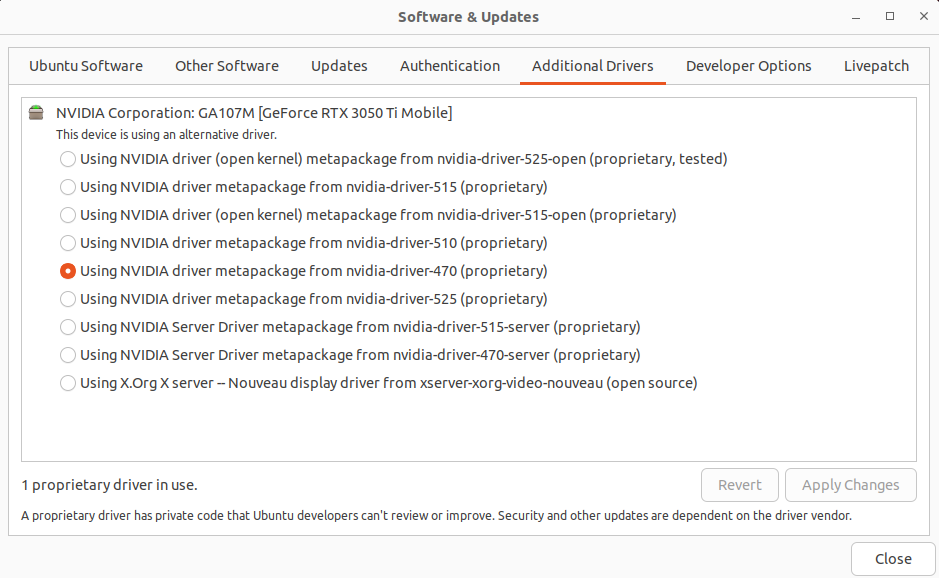
Today I came back to my OpenCL project (can be found here). I have had not tried it on my fresh Ubuntu 22 installation on my Dell g15 with RTX 3050 Ti. Altough I’ve got NVIDIA driver metapackage installed my program reported that there is some problem with shared library:
You can check if the driver is selected in system About window. So there it is in my case, but nvidia-selector command reports that I have nvidia-driver-525 which is weird as drivers tab says I have installed driver 470. On the other hand, running nvidia-smi command says I have enable driver 470. Weird.
I came across some solution which says that I should install libopencl-clang-dev:
sudo apt install libopencl-clang-dev
I restarted IntelliJ IDEA 2022.3 Community Edition and even proceeded with system reboot to no avail, still the same issue. Next thing to check is libOpenCL library symlink looking for missing either symlink itself or target files:
ls -la /usr/lib/x86_64-linux-gnu/ | grep libOpenCL
I have both.
Finally I found a post stating that I should have ocl-icd-opencl-dev:
sudo apt-get purge ocl-icd-opencl-dev
sudo apt-get autoremove # this could be risky however
sudo apt-get install ocl-icd-opencl-dev
And voilà I got it working. However I have only GPU recognized, no CPU on the list of available devices. That is weird but most probably I should install some Intel SDK or at least their libraries to have it working also for CPU. NVIDIA package do not provide runtime for CPU. Now I remember that for book project I have been running it on Windows instead of Linux…
I thought that installing pg gem on my clean Ubuntu 22 will be easy, but no. I got some weird message:
The following packages have unmet dependencies:
 libpq-dev : Depends: libpq5 (= 14.5-0ubuntu0.22.04.1) but 15.1-1.pgdg22.04+1 is to be installed
E: Unable to correct problems, you have held broken packages
So I tried to force installation:
sudo apt-get install libpq5=14.5-0ubuntu0.22.04.
After this:
sudo apt install libpq-dev
sudo gem install pg
On this Ubuntu 22 release installing Ruby interpreter from packages you got 3.0.2p107. The problem might be because of pgadmin4 which I installed before, so it could break something.
I tried to compile my c++ code with c++11 features on GCC 4.2.1 which is default on my MacBookPro3,1 with MacOS 10.8.5. I used random library, so I needed newer version of GCC, 4.7 at least to be more precise. I already have MacPorts on this machine (installation guide can be found here). So:
/opt/local/bin/port install gcc5
No I can compile:
/opt/local/bin/g++-mp-5 -std=c++11 main.cpp
Even that you use GCC 5.5.0 you need to pass flag to enable c++11.
If someone thinks that this was too easy, then lets try to do this on MacOS 10.4.11 on PowerBook3,4. First thing is to install XCode 2.5 which suppose to be the last one for 10.4 operating system. You can grab it from xcodereleases.com after signing in with your Apple ID. Install XCode and then download MacPorts 2.8.0. Next, install GCC 5 using same command as previously. This time it will take forever to build it as it has way less powerful hardware than newer MacBookPro3,1. During that time it got so hot so I could not even touch keyboard. Iit was around 50 degrees Celcius while being cooled and over 65 degrees without cooling.
Unfortunately GCC 5 is not supported and you need to install GCC 4.8 or at least 4.7. Prepare one day for building libgcc6, another day for libgcc7, one more for GCC itself and half a day for other stuff.