RPCEnvironment init request failed

I thought of adding another Proxmox node to the cluster. Instead of having PBS on separate physical box I wanted to have it virtualized, same as on any other environment I setup. So I installed fresh copy of the same Proxmox VE version and tried to join the cluster. And then this message came:

Connection error 500: RPCEnvironment init request failed: Unable to load access control list: Connection refused

And plenty other regarding hostname, SSH keys, quorum etc. Finally Proxmox UI went broke as I was unable to sign in. Restarting cluster services ended with some meaningless information. So I was a little bit worried about the situation. Of cource I got backup of all things running on that box, but it would be annoying to bring it back from backup.

Solution, or rather monkey-patch for this is to shutdown this new node. On any other working node (preferably on leader) execute:

umount -l /etc/pve
systemctl restart pve-cluster

This command unomunts and remounts FUSE filesystem and then restarts PVE cluster service. What was the root cause of this? Actually I do not know for sure, but I suspect either networking or filesystem issue causing some discrepancies on distributed configuration. I even added all node domains to local pfSense resolved to be sure that it is not DNS issue. Another options is that 2 out of 4 nodes have additional network interface with bridge. Different filesystems (ZFS vs XFS) might be a problem, but I do not think so anymore, as 2 nodes already got ZFS and adding them to cluster was without any problems in the past.

I decided not to restart any nodes or separate them as it might cause permanent obstruction. So it stays as a mistery, with monkey-patch to have it running once again.
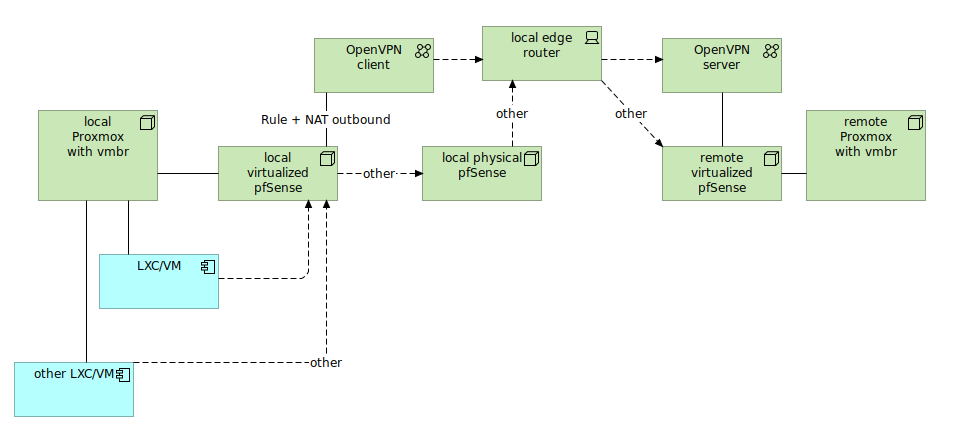
Selective routing thru multiple pfSense and OpenVPN

Lets say you want to pass traffic from your local container/VM via some external pfSense box. This way there is no need to setup VPN on each container you want to include in the setup. There is OpenVPN option to pass all traffic thru the tunnel, but it breaks several other things both locally and on remote pfSense box.

So there is this network configuration:

Local virtualizated pfSense purpose is to pass-thru traffic. So it has only one interface which is WAN. No LAN interface over there. Addressing can be the same as on local physical pfSense.

You need to first setup OpenVPN client (CA, certificate, user and connection) and then create interface assignment upon this connection. It will called something like ovpncX. Remember that OpenVPN is restricted name so you need to call your interface with other name.

To differentiate traffic from LXC/VM create pass rule with source set at this LXC/VM and in advanced settings point OpenVPN client gateway. Remember to put this rule before any other catch-all rules. Once you got OpenVPN client and pass rule, go to NAT outbound and set manual outbound NAT to enter rule manually. Use LXC/VM address as source and select OpenVPN client interface.

To differentiate traffic from other LXC/VM not to pass traffic thru OpenVPN client, add another NAT outbound (no need to set pass rule here as we use default gateway) and set WAN interface and other LXC/VM address as source.

Now you would have one LXC/VM passing traffic thru remote OpenVPN (via OpenVPN client) and the other LXC/VM passiing traffic regularly thru WAN into secondary physical pfSense and then into the internet. This way you can manage how to expose your traffic to public internet.

OpenHAB failing to grab RTSP snapshots

If you have OpenHAB on Proxmox or any other virtualization and it sometimes fails to grab RTSP stream and create snapshots, then there is high chance that everything is fine with the camera and network and the problem is within your server hardware. I was investigating this matter a lot and came into this simple conclusion.

If camera does not have built snapshot URL coming from ONVIF (like on EasyCam WiFi with both ONVIF and Tuya) then your OpenHAB will try to make one from RTSP stream with ffmpeg. It starts ffmpeg process which will periodically (in my case every 2 seconds) grab frame and make JPEG out of it. However if you run your OpenHAB on some older hardware like I do (i3-4150 with 2c/4t) there is a chance that 100% utilization spikes on one vCore is too much for it… really. I noticed that with those CPU util spikes come also other connectivity issues and migrating OpenHAB to different server within the same cluster solved almost 100% the problem.

Instead of no image every minute or so now it misses snapshot every few hours. It might do this still because of WiFi signal strength and not because of lack of computational power on server side. There might be also case when camera is buy doing other things. Hikvision cameras notifies you with proper XML error code about this. Maybe there is also the case with EasyCam cameras. Who knows.

IP2Location – complete IPv4 ranges ingestion

IP2Location is a IP address databases where you can find the latest IP to location associations. The complete IPv4 range is 4 294 967 296 addresses which is 32 bit. IP2Location contains 4 291 944 710 addresses which is a little less. However as much as 608 487 295 addresses come with no location set. It is because of:

  • 0.0.0.0/8 (local)
  • 10.0.0.0/8 (class A)
  • 100.64.0.0/10 (shared)
  • 127.0.0.0/8 (host)
  • 169.254.0.0/16 (link-local)
  • 172.16.0.0/12 (class B)
  • 192.0.0.0/24 (dual-stack)
  • 192.0.2.0/24 (documentation etc)
  • 192.88.99.0/24 (reserved, IPv6 to IPV4)
  • 192.168.0.0/16 (class C)
  • 198.18.0.0/15 (benchmarking)
  • 198.51.100.0/24 (documentation etc)
  • 203.0.113.0/24 (documentation etc)
  • 224.0.0.0/4 (multicast, class D)
  • 233.252.0.0/24 (documentation etc)
  • 240.0.0/4 (reserved, class E)
  • 255.255.255.255/32 (broadcast)

Above should not have location set as those are special IPv4 ranges. So valid commercial (and non-commercial also) use IPv4 addresses count should be somewhere near value of 3 683 457 415, which is all addresses minus addresses without location. DARPA developed IPv4 started in 1981 and has been exhausted in 2011.

How does this apply to Cassandra databases?

Complete 3.6B addresses weights around 40GB of data in single Apache Cassandra 5.0 node. Using commodity hardware with Intel i5 10200H and Western Digital SN530 NVME drive we can get up to 29k inserts per second. Doing the math the complete ingestion should finish within 35 hours. However if we would put multiple Cassandra nodes to split writes it most probably be much faster. Lets say we would run at 100k/s so ingestion time would be 10 hours. With 1M/s this would run for only 1 hour.