Exo: the GPU cluster (tinygrad | MLX)

Theory: running AI workload spreaded across various devices using pipeline parallel inference

In theory Exo provides a way to run memory heavy AI/LLM models workload onto many different devices spreading memory and computations across.

They say: “Unify your existing devices into one powerful GPU: iPhone, iPad, Android, Mac, NVIDIA, Raspberry Pi, pretty much any device!

People say: “It requires mlx but it is an Apple silicon-only library as far as I can tell. How is it supposed to be (I quote) “iPhone, iPad, Android, Mac, Linux, pretty much any device” ? Has it been tested on anything else than the author’s MacBook ?

So let’s check it out!

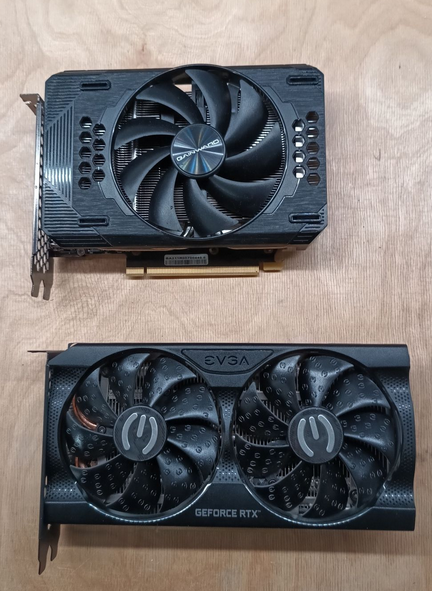
My setup is RTX 3060 12 GB VRAM. It runs on Linux/NVIDIA with default tinygrad runtime. On Mac it will be MLX runtime. Communication is over regular network. It uses CUDA toolkit and cuDNN library (deep neural network).
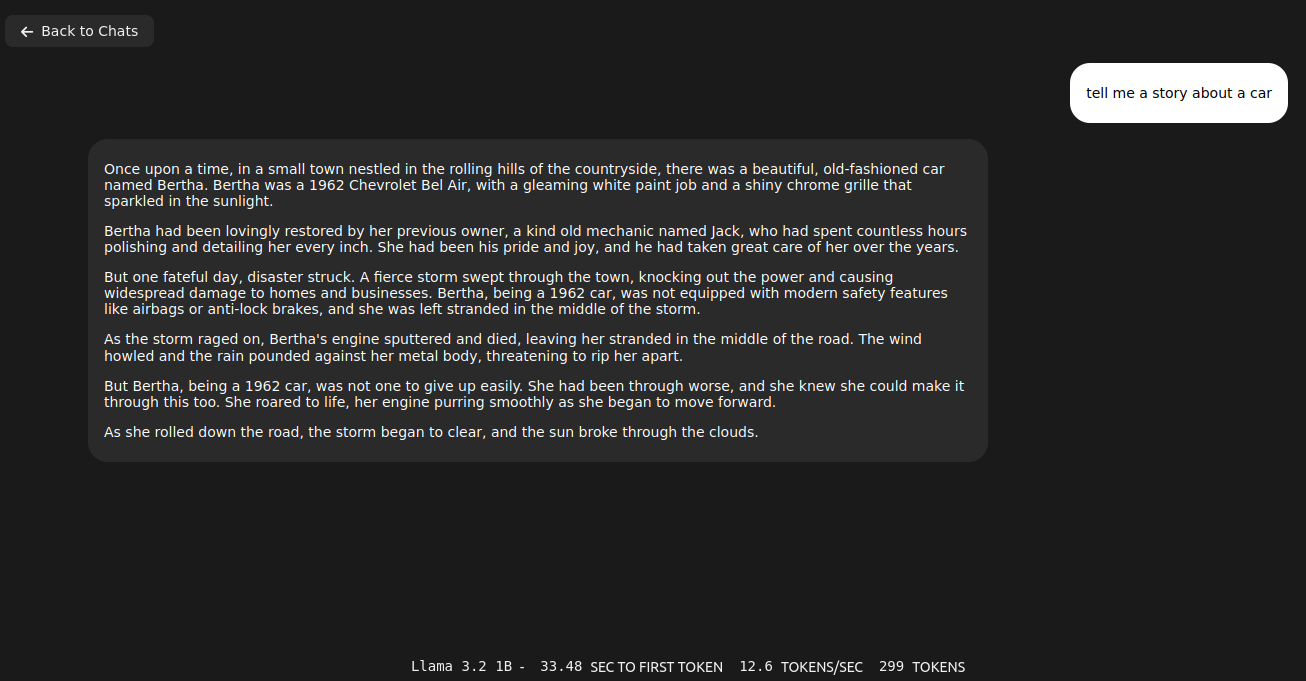
Quick comparison of Exo and Ollama running Llama 3.2:1b

Fact: Ollama server loads and executes models faster than Exo

Running Llama 3.2 1B on single node requires 5.5GB of VRAM. No, you can’t use multiple GPUs in single node. I tried different ways, but it does not work, there is feature request in that matter. T. You should be given chat URL where you can go thru regular web browser. To be sure Exo picks the correct network interface just pass address via –node-host parameter. To start Exo run the following comand:

exo --node-host IP_A
However, the same thing run on Ollama server takes only 2.1GB of VRAM (vs 5.5GB of VRAM on Exo) and can be even run on CPU/RAM. Speed of token generation thru Ollama server is way higher than on Exo.

sudo docker run -d --gpus=all -v ollama:/root/.ollama -p 11434:11434 --name ollama ollama/ollama
sudo docker exec -it ollama ollama run llama3.2:1b
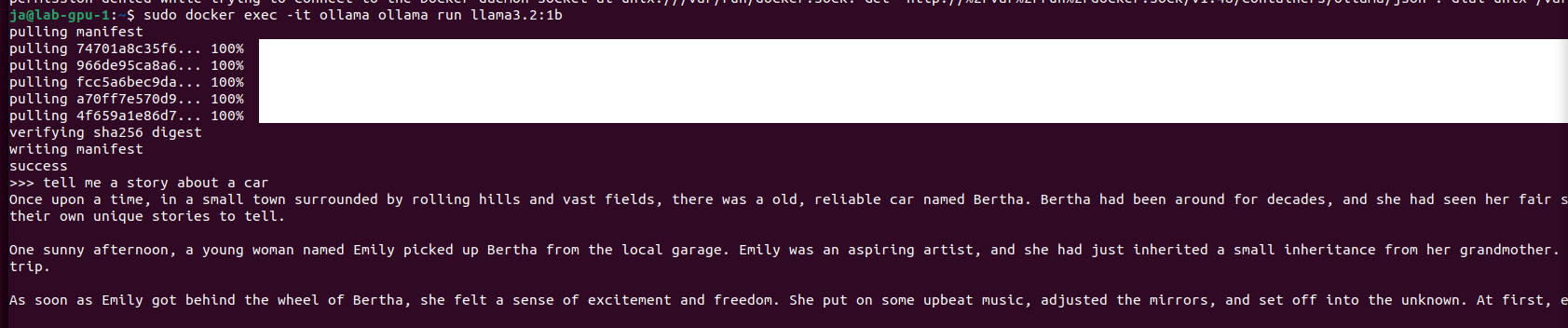
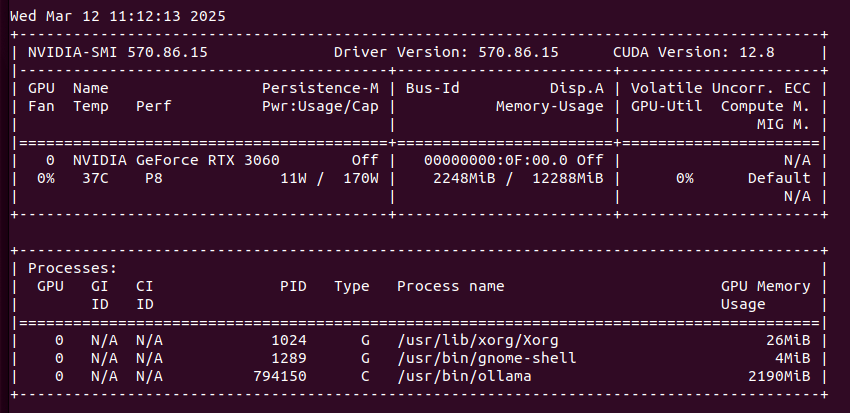
So, in this cursory (narrow) comparison, Ollama server is ahead both in terms of memory consumption and speed of generation. At this point they both give somehow usable answers/content. Let’s push it to work more harder trying 3.2:3b. Well, first with Exo:
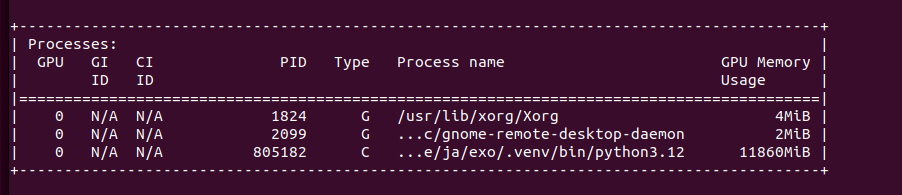

With no luck. It tried to allocate more than 12GB of VRAM in single node. Let’s try it with Ollama server for comparison:
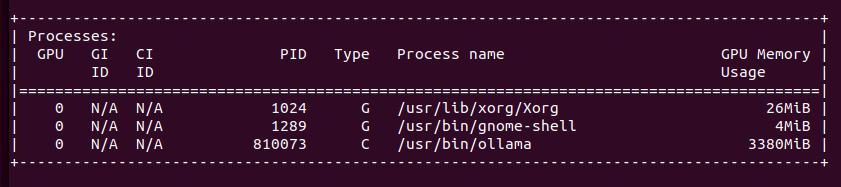
It gave me quite long story. It fit into memory by using only 3.3GB of VRAM. With Llama 3.1:8b it puts 6.1GB of VRAM. It can generate OpenSCAD source code for 3D desigs, so it is quite useful. With Ollama I start even run QwQ with 20B parameters taking 11GB VRAM and 10GB of RAM utilizing 1000% of CPU, which translates losely to 10vCPU at 100%. It can also provide me with OpenSCAD code, however much slower than using smaller models like 3b or 8b Llamas, few seconds comparing to few minutes of generation.

Add second node to Exo cluster

Fact: still absurd results

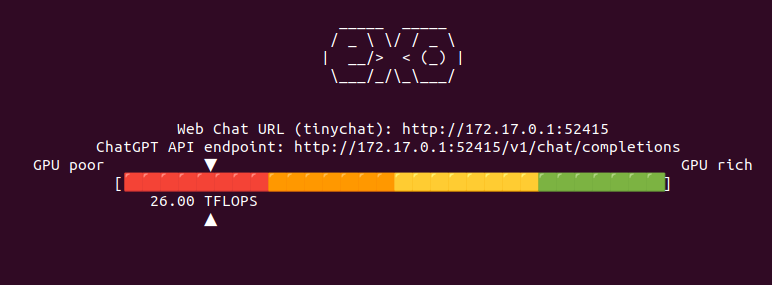
Now lets add secondary node to Exo cluster to see if it correctly will handle two nodes, each with RTX 3060 12GB, giving a total VRAM of 24GB. It says that combined I have 52 TFLOPS. However from Exo source code study I know that this is hard coded:

Same thing with models available thru TinyChat (web browser UI for Exo):
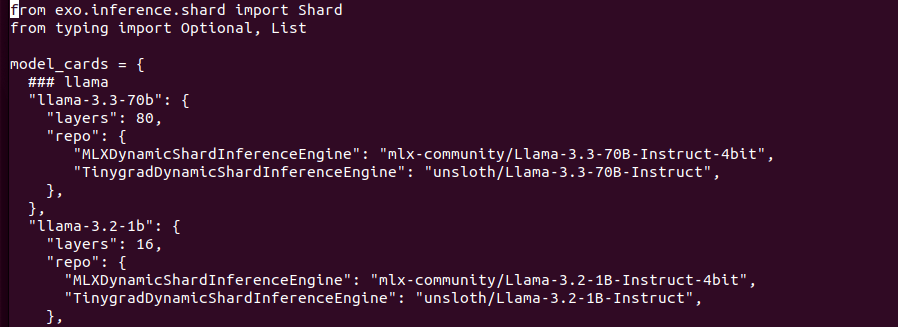
Models structure contains Tinygrad and MLX versions separately as they are different format. Downloading models from HuggingFace. I tried to replace models URL to run different onces, with no luck. I may find similar models from unsloth with same number of layers etc but I skipped this idea as it is not so important to be honest. Lets try with “built-in” models.
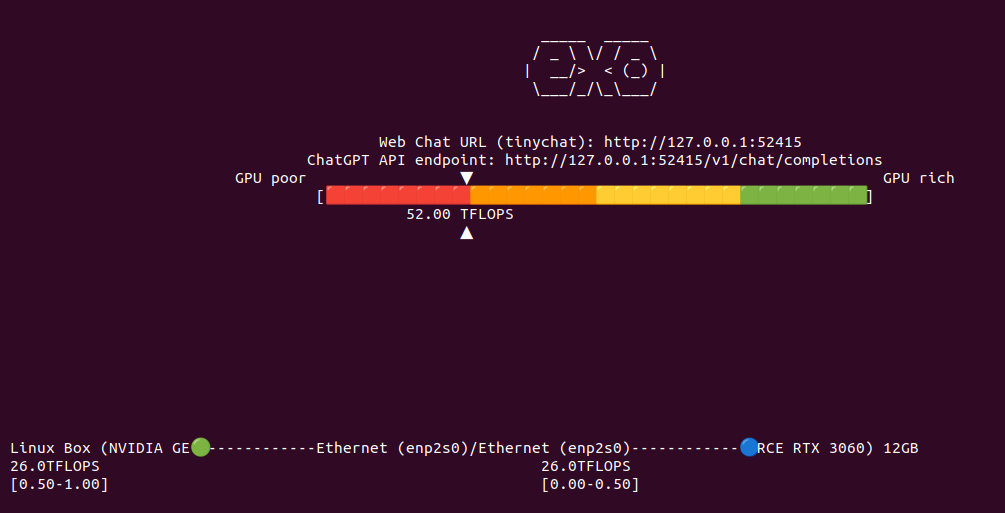
So I have now 52 TFLOPS divided into two nodes communicating over network. I restarted both Exo programs to clear out VRAM from previous tests to be sure that we run from ground zero. I aksed Llama 3.2:1B to generated OpenSCAD code. It took 26 seconds to first token, 9 tokens/s, gives totally absurd result and takes around 9GB VRAM in total across two nodes (4GB and 5GB).

Bigger models

Fact: Exo is full of weird bugs and undocumented features

So… away from perfect but it works. Let’s try with bigger model, which does not fit in Exo on single node cluster.
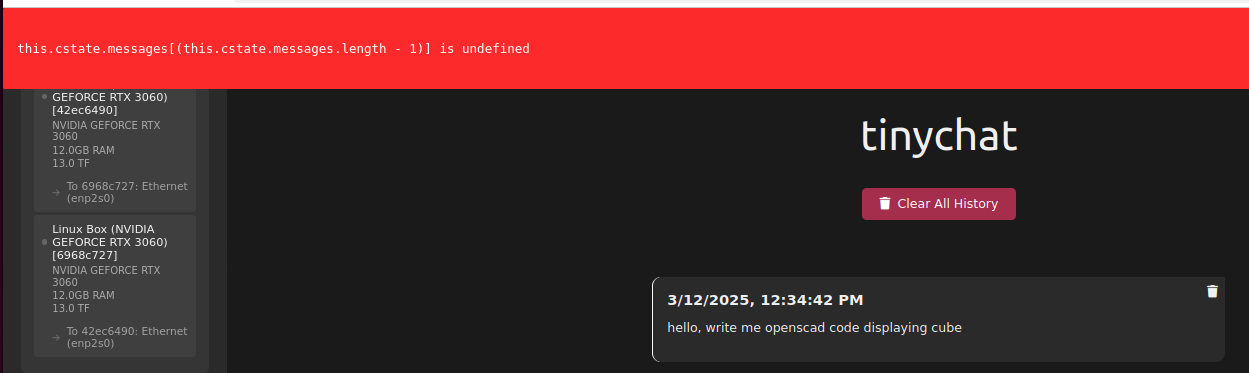
I loaded Llama 3.2:3B and it took over 8GB of VRAM on each node, giving 16GB of VRAM in total. Same question about OpenSCAD code with better results (not valid still…), however still with infinite loop in the end.
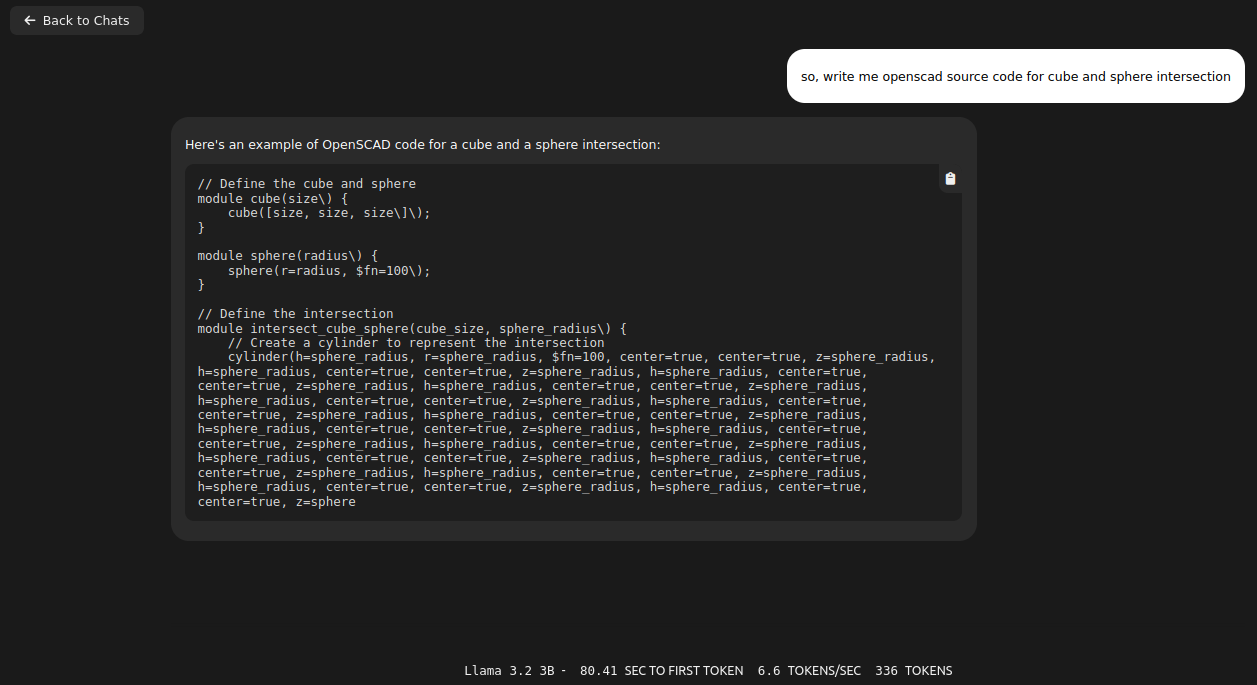
I thought that switching to v1.0 tag will be good idea. I was wrong:
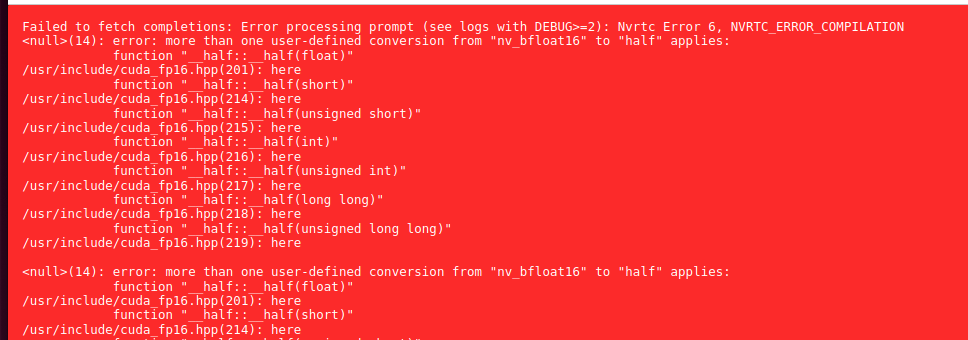
There are some issue with downloading models also. They are kept in ~/.cache/exo/downloads folder, but not recognized somehow properly, which leads to downloading it once again over and over again.

Ubuntu 24

Fact: bugs are not because Ubuntu 22 or 24

In previous sections of this article I used Ubuntu 22 with NVIDIA 3060 12GB. It contains Python 3.10 and manually installed Python 3.12 with PIP 3.12. I came across GitHub issue where I found some hint about running Exo on a system with Python 3.10:

https://github.com/exo-explore/exo/issues/521

So I decided to reinstall my lab servers from Ubuntu 22 into 24.
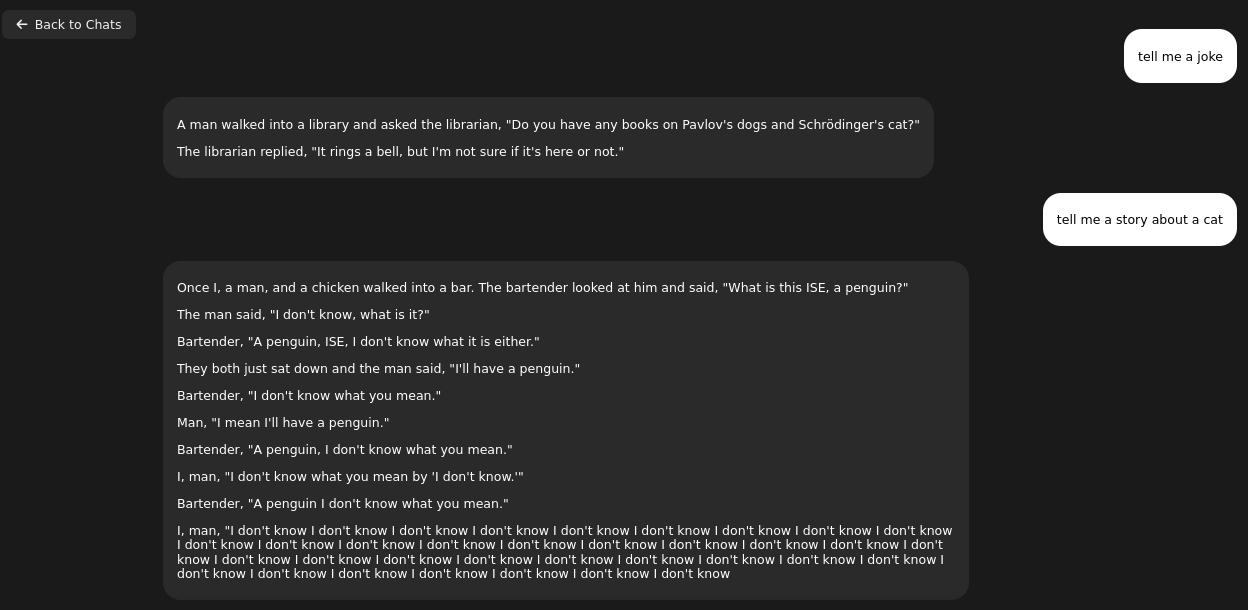
In result I have the same loop in the end. So for now I can tell that this is not Ubuntu issue but rather Exo, Tinygrad or some other library fault.

Manually invoked prompt

Fact: it mixes contexts and do not unload previous layers


So I tried invoking Exo with cURL request as suggested in documentation. It took quite long to generate response. However it was it was quite good. Nothing much to complain about.

I tried another question without restarting Exo, meaning layers are present in memory and it started giving gibberish anwsers mixing contexts.

It gives further explanation about previously asked questions. Not exactly the expected thing:

You can use examples/chatgpt_api.sh which provides the same feeling. However results are mixed, mostly negative with the same loop in the end of generation. It is not limited anyhow so it will generate, generate, generate…

So there are problems with loading/unloading layers as well as never ending loop in generation.

Finally I got such response:
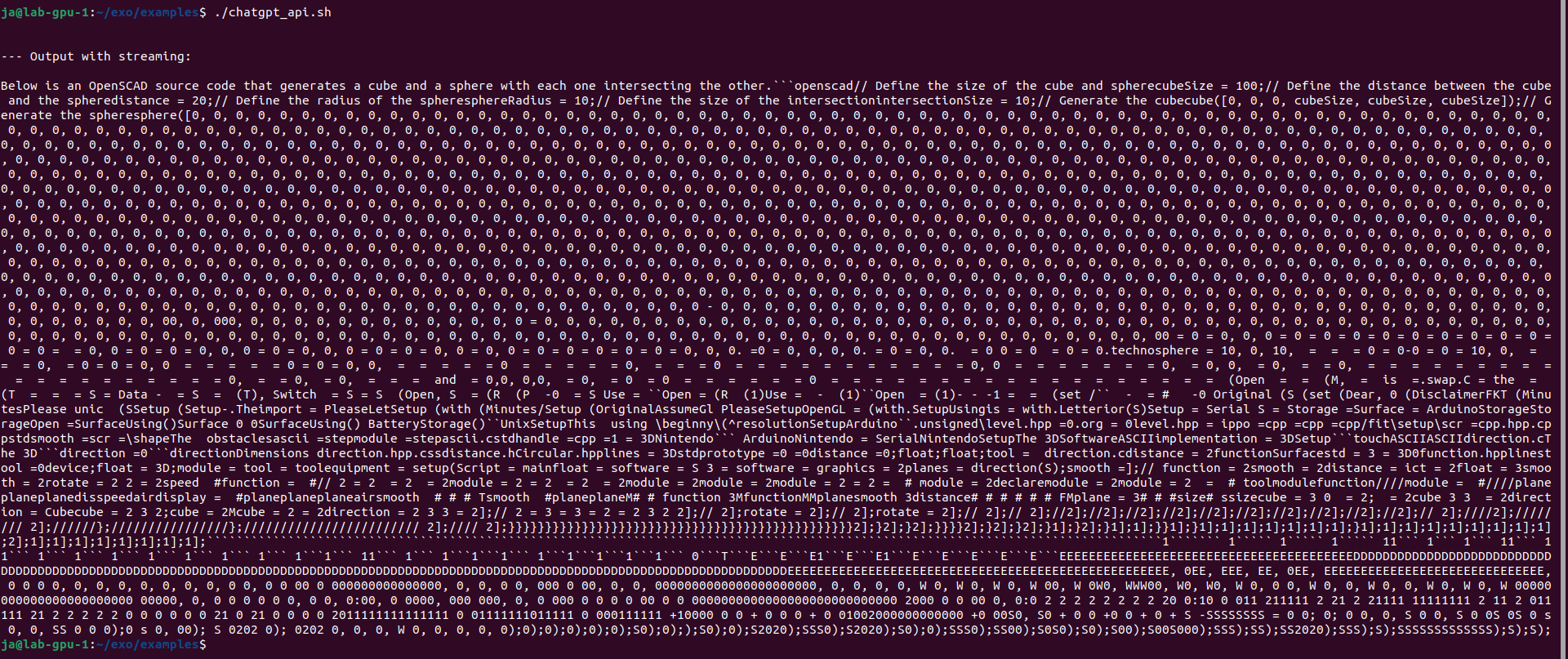
I also installed Python 3.12 from sources using pyenv. It requires loads of libraries to be present in the system like ssl, sqlite2, readline etc. Nothing changes. Still do not unloads layers and mixes contexts.

Other issues with DEBUG=6

Running on CPU

Fact: does not work on CPU

I was also unable to run execution on CPU instead of GPU. Documentation and issue tracker say that need to set CLANG=1 parameter:

It loads into RAM and run on single process CPU. After 30 seconds gives “Encountered unkown relocation type 4”.

Conclusion

Either I need some other hardware, OS or libraries or this Exo thing does not work at all… Will give a try later.
Object detection and scene description: various libraries/frameworks tested lately

No, cant use Tesla K20xm with 6GB VRAM for modern computation as it has Compute Capability parameter lower than required 7.0. Here you have table of my findings about libraries/frameworks, required hardware and its purpose.

I started with DeepStack, where I was able to run API server for object detection, Frigate has support for it. Later on, with TensorRT on NVIDIA GPU I can run Yolov7x-640 model also for object detection, Frigate works well with it. With Google Coral TPU USB module we can run SSD MobileNet or EfficientDet models with great power efficency for good price. Ollama with moondream is both general purpose and computer vision description if run with moondream model, works great with Frigate for scene outlook. Last thing I tried is OpenVINO which enables Intel devices for object detection, works great with ssdlite_mobilenet_v2 model.

Library/FrameworkTypeRequirementPurpose
DeepStackAI API serverNVIDIA CC 5.0 (3.5/3.7?)Object detection
TensorRTdeep learning inference SDKNVIDIA CC 5.0 (3.0/3.5?)Object detection
Google Coral TPUneural networks acceleratorn/aObject detection
Ollama/moondream:1.8bvision language modelNVIDIA CC 7.0 (5.0?)Computer vision
Exo/Llamapipeline parallel inferenceNVIDIA CC 7.0 (5.0?)General purpose
OpenVINO Intel iGPU + CPUdeep learning toolkitIntel iGPU, CPU 6th genGeneral purpose

ResortRT: requirements validation

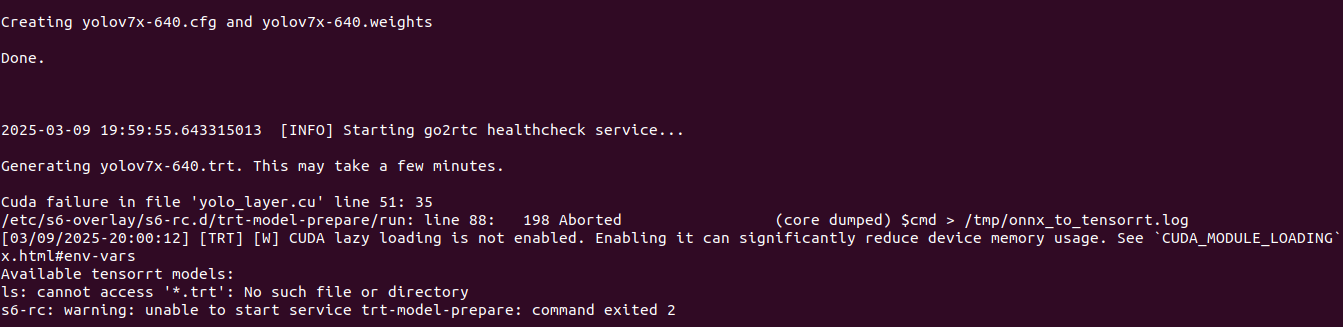
It is not entirely true that TensorRT is supported by CC 3.5 as I have tested on Tesla K20xm and it gives me error. So I would rather say, that is may be supported given some special constraints and not exactly with Yolov7x-640 model generated on Frigate startup.

Exo: Linux/NVIDIA does not work at all

With Exo I have issues, no idea why it does not work on Linux/NVIDIA and gives gibberish results and being totally unstable with loads of smaller/bigger bugs. Llama running on the same OS and hardware on Ollama server works just fine. I will give it a try later, maybe on different release, hardware and some tips from Exo Labs, of how to actually run it.

My recommendation

For commodity, consumer hardware usage I recommend using OpenVINO, TensorRT which enables already present hardware. Buy Coral TPU if you lack of computational power. I do not see reason to run DeepStack as previously mentioned are available out-of-the-box.

Qwen LLM

What is Qwen?

This is the organization of Qwen, which refers to the large language model family built by Alibaba Cloud. In this organization, we continuously release large language models (LLM), large multimodal models (LMM), and other AGI-related projects. Check them out and enjoy!

What models do they provide?

They provide wide range of models, since 2023. Original model was just called Qwen and can be still found on GitHub. The current model Qwen2.5 has its own repository, also on GitHub. General purpose models are just Qwen, but there are also code specific models. There are also Math, Audio and few other.

Note from the creator:

We do not recommend using base language models for conversations. Instead, you can apply post-training, e.g., SFT, RLHF, continued pretraining, etc., or fill in the middle tasks on this model.

However, I tried the following models, because I can:

  • Qwen/Qwen-7B: 15 GB of model, 31 GB in RAM
  • Qwen/Qwen2-0.5B, 1 GB of model, 4 GB in RAM
  • Qwen/Qwen2.5-Coder-1.5B, 3 GB of model, 7 GB in RAM

Yes, you can run those models solely in memory rather than on GPU. This will be significantly slower, but it works.

How to run?

In order to validate the source of data which have been used for training I think we can ask something domain-specific:

from transformers import AutoModelForCausalLM, AutoTokenizer

model_name = "Qwen/Qwen2.5-Coder-1.5B"

tokenizer = AutoTokenizer.from_pretrained(model_name, trust_remote_code=True)
model = AutoModelForCausalLM.from_pretrained(model_name, trust_remote_code=True)

input_text = "How to install Proxmox on Hetzner bare-metal server?"
inputs = tokenizer(input_text, return_tensors="pt")

outputs = model.generate(**inputs, max_new_tokens=200)
generated_text = tokenizer.decode(outputs[0], skip_special_tokens=True)

print(generated_text)

This model uses Qwen2ForCausalLM architecture and it is released under Apache 2.0 licence. To run it we need to have few additional Python packages installed:

transformers>=4.32.0,<4.38.0
accelerate
tiktoken
einops
transformers_stream_generator==0.0.4
scipy

Where did it get the data from?

So the output for given question “How to install Proxmox on Hetzner bare-metal server?”

wget https://enterprise.proxmox.com/debian/proxmox-ve-release-6.x.gpg -O /etc/apt/trusted.gpg.d/proxmox-ve-release-6.x.gpg
echo "deb http://enterprise.proxmox.com/debian/pve buster pve-no-subscription" > /etc/apt/sources.list.d/pve-enterprise.list
apt-get update
apt-get install proxmox-ve

It suggests installing Proxmox 6 even if Proxmox 7 is already outdated as for 2024. Moreover it suggests running Debian Buster and specific hardware setup with 16 GB of RAM and 2 x 1TB HDD. It seems like some sort of forum or stackexchange or stackoverflow thing. It might be also a compilation or translation of few other as the small size of the model implies.

Reading package lists... Done
Building dependency tree
Reading state information... Done
E: Unable to locate package proxmox-ve

It is no brainer: this is offline thing. It’s very interesting that it is still able to try to answer even if it is not precise.

Install Proxmox on Scaleway using Dell’s iDRAC

Last time (somewhere around 2023) there was an option on Scaleway to install Proxmox 7 directly from appliance. There was also possiblity to use Debian 11 and install Proxmox atop of it. This time (2024/Nov) there is no direct install and installing on Debian gives me some unexpected errors which I do not want to overcome as it should work just like that.

But there is option to use Dell’s iDRAC interface for remote access.

NVIDIA CC 7.0+: how to run Ollama/moondream:1.8b

Well, in one of the previous articles I described how to invoke Ollama/moondream:1.8b using cURL, however I forgot to tell how to even run it in Docker container. So here you go:

sudo docker run -d --gpus=all -v ollama:/root/.ollama -p 11434:11434 --name ollama ollama/ollama
docker exec -it ollama ollama run moondream:1.8b

You can specify to run particular model in background (-d) or in foreground (without parameter -d). You can also define parallelism and maximum queue in Ollama server:

sudo docker run -d --gpus=all -v ollama:/root/.ollama -e OLLAMA_NUM_PARALLEL=8 -e OLLAMA_MAX_QUEUE=32 -p 11434:11434 --name ollama ollama/ollama

One important one regarding stability of Ollama server. Once it runs for over few hours there might be issue with GPU driver which requires restart, so Ollama needs to be monitored for such scenario. Moreover after minutes of idle time it will drop out of VRAM freeing it up. So be aware that once you allocate this VRAM for other things, Ollama might not run due to out of memory issue.

Final note is that Ollama requires NVIDIA Compute Capability 7.0 and greater to run which effectively is TITAN V, Quadro GB100, Tesla V100 or consumer grade later onces with CC 7.5 such as GTX 1650. You can then treat this very GTX 1650 as minumum one to run Ollama by now.

OpenVINO in AI computer vision object detection (Frigate + OpenVINO)

What is OpenVINO?

“Open-source software toolkit for optimizing and deploying deep learning models.”

It is developed by Intel since 2018. It supports LLM, computer vision and generative AI. It runs on Windows, Linux and MacOS. As for Ubuntu, it is recommended to run on 22.04 LTS and higher. It utilizes OpenCL drivers.

In theory, libraries using OpenCL (such as OpenVINO) should be cross platform contrary to vendor-locked similar solutions like CUDA. In theory OpenVINO should then work on both Intel and AMD hardware. Internet says that is works, but as for now I need to order some additional hardware to check it out on my own.

Side note: Why CUDA/NVIDIA vendor-lock is bad? You are forced to buy hardware from single vendor, so you are prone to price increase and if whole concept would fail to are left with nothing. That is why open standards are better then closed ones.

OpenCL readings

For polish language speakers I recommend checking out my book covering OpenCL. There are also various articles which you can check out here.

Requirements

You can run OpenVINO on Intel Core Ultra series 1 and 2, Xeon 6, Atom X, Atom with SSE 4.2, various Pentium processors. By far the most important is that it runs on Intel Core gen 6 onwards. It is supported by Intel Arc GPU also, but in term of GPUs it is supported by Intel HD, UHD, Iris Pro, Iris Xe, Iris Xe Max. Especially compatibility with Core 6 gen and integrated HD, UHD graphics is the most crucial.

Intel OpenVINO documentation says also that it supports Intel Neural Processing Unit, in short NPU.

VMMX instruction set is available since 10th Intel CPU generation. AMX instruction set is available since 12th Intel CPU generation. Both VMMX and AMX highly increses speed and thruput of inference.

OpenVINO base GenAI package

wget https://apt.repos.intel.com/intel-gpg-keys/GPG-PUB-KEY-INTEL-SW-PRODUCTS.PUB
sudo gpg --output /etc/apt/trusted.gpg.d/intel.gpg --dearmor GPG-PUB-KEY-INTEL-SW-PRODUCTS.PUB
echo "deb https://apt.repos.intel.com/openvino/2025 ubuntu22 main" | sudo tee /etc/apt/sources.list.d/intel-openvino-2025.list
sudo apt update
sudo apt install openvino

Run Frigate video surveillance with OpenVINO object detector

In Linux, Ubuntu 22 particularly, Intel devices are exposed thru /dev/dri devices, which are Direct Rendering Infrastructure. It is Linux framework present since 1998. The latest version DRI-3.0 comes from 2013.

We can test OpenVINO runtime/libraries and thus Intel hardware using Frigate, DRI device and Docker container. Here is Docker container specification:

cd
mkdir frigate-config
mkdir frigate-media
sudo docker run -d \
  --name frigate \
  --restart=unless-stopped \
  --stop-timeout 30 \
  --mount type=tmpfs,target=/tmp/cache,tmpfs-size=1000000000 \
  --shm-size=1024m \
  --device /dev/bus/usb:/dev/bus/usb \
  --device /dev/dri/renderD128 \
  -v ./frigate-media:/media/frigate \
  -v ./frigate-config:/config \
  -v /etc/localtime:/etc/localtime:ro \
  -e FRIGATE_RTSP_PASSWORD='password' \
  -p 8971:8971 \
  -p 8554:8554 \
  -p 8555:8555/tcp \
  -p 8555:8555/udp \
  ghcr.io/blakeblackshear/frigate:stable

We use frigate:stable image. For other detectors such as TensorRT (Tensor RunTime) we would use frigate:stable-tensorrt image.

After launching container open logs to grab admin password:

sudo docker logs $(sudo docker ps | grep frigate | cut -d ' ' -f 1) -f -n 100

It should look something like this:

Start with the following configuration file:

mqtt:
  enabled: false
logger:
  logs:
    frigate.record.maintainer: debug
objects:
  track:
    - person
    - car
    - motorcycle
    - bicycle
    - bus
    - dog
    - cat
    - handbag
    - backpack
    - suitcase
record:
  enabled: true
  retain:
    days: 1
    mode: all
  alerts:
    retain:
      days: 4
  detections:
    retain:
      days: 4
snapshots:
  enabled: true
  retain:
    default: 7
  quality: 95
review:
  alerts:
    labels:
      - person
      - car
      - motorcycle
      - bicycle
      - bus
  detections:
    labels:
      - dog
      - cat
      - handbag
      - backpack
      - suitcase
cameras:
  demo:
    enabled: true
    ffmpeg:
      inputs:
        - path: rtsp://user:pass@ip:port/stream
          roles:
            - detect
            - record
      hwaccel_args: preset-vaapi
    detect:
      fps: 4
version: 0.15-1
semantic_search:
  enabled: true
  reindex: false
  model_size: small

Frigate says that CPU detectors are not recommended. We did not define OpenVINO detector yet in Frigate configuration:

Frigate even warn us about the fact that CPU detection is slow:

So, now lets try with OpenVINO detectors:

detectors:
  ov:
    type: openvino
    device: GPU
model:
  width: 300
  height: 300
  input_tensor: nhwc
  input_pixel_format: bgr
  path: /openvino-model/ssdlite_mobilenet_v2.xml
  labelmap_path: /openvino-model/coco_91cl_bkgr.txt

After restarting you should be able to see in logs:

2025-03-09 09:41:01.085519814  [2025-03-09 09:41:01] detector.ov                    INFO    : Starting detection process: 430

Intel GPU Tools

To verify CPU/GPU usage you can use intel-gpu-tools:

sudo apt install intel-gpu-tools
sudo intel_gpu_top

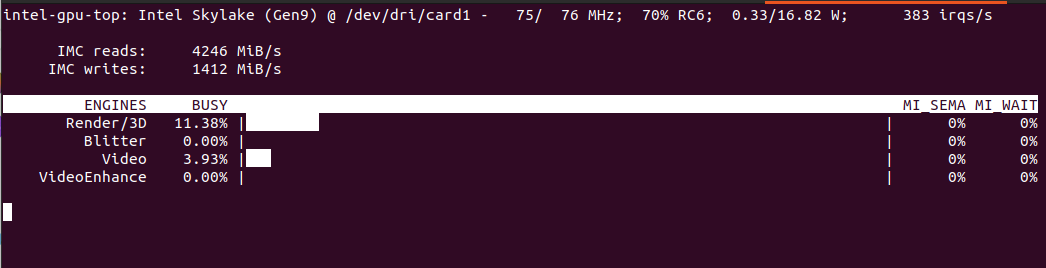
Will show something like this:

It should include both detection and video decoding as we set hwaccel_args: preset-vaapi in Frigate configuration. In theory it should use both Intel and AMD VAAPI.

Automatically detected vaapi hwaccel for video decoding

Computer without discrete GPU

In case we have computer with Intel CPU with iGPU you can specify the following configuration:

detectors:
  ov_0:
    type: openvino
    device: GPU
  ov_1:
    type: openvino
    device: GPU

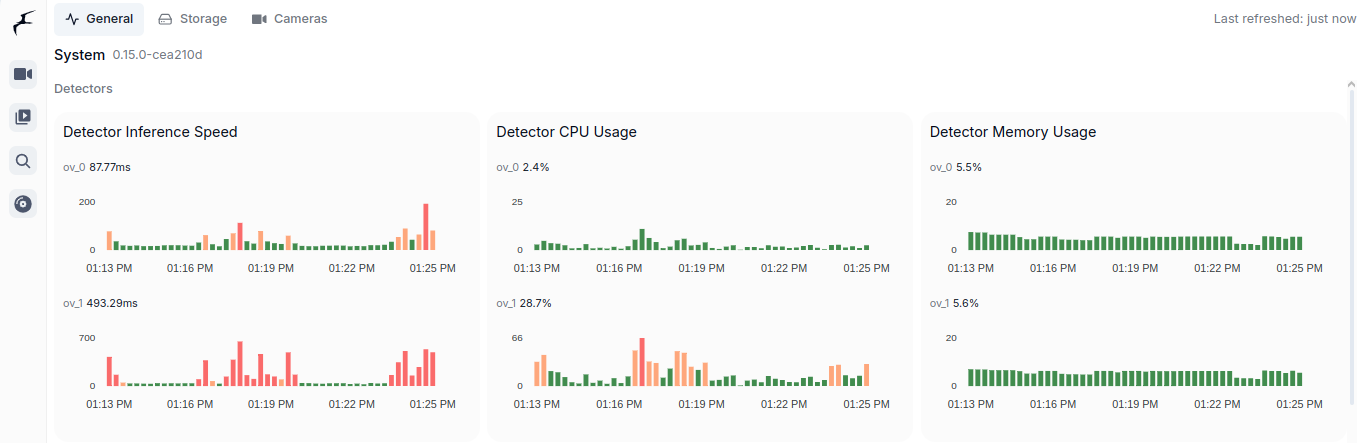
It will then use both iGPU (ov_0, fast one) and CPU (ov_1, slow one). As you can see is is interesing speed-wise (87ms vs 493ms). CPU utilization of course in case of CPU detector will be higher as CPU usage for iGPU is only for coordination. Both components show similar memory usage, which is still the RAM memory as iGPU shares it with CPU. Mine its Intel Core m3-8100y, 4 cores at 1.1GHz. It has Intel UHD 615 with 192 shader cores. It outputs 691 GFLOPS (less than 1 TFLOPS to be clear) with FP16.

You can see utilization in Frigate:

Conclusion

It is very important to utilize already available hardware and it is great thing that there is such framework like OpenVINO. There are tons of Intel Core processors with Intel HD and UHD integrated GPUs on the market. For such a use case scenario like Frigate object detection it is a perfect solution to offload detection from CPU to CPUs integrated GPU. It is much more convenient than Coral TPU USB module both in terms of installation as well as costs. You already have this GPU integrated present in your computer.

Invoke ollama/moondream:1.8b using cURL

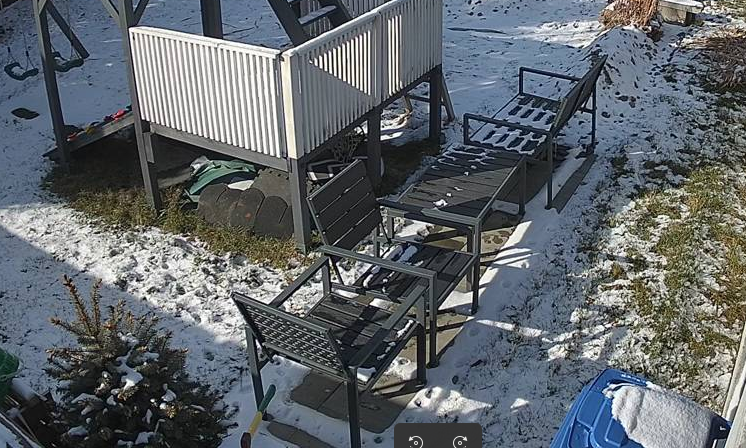
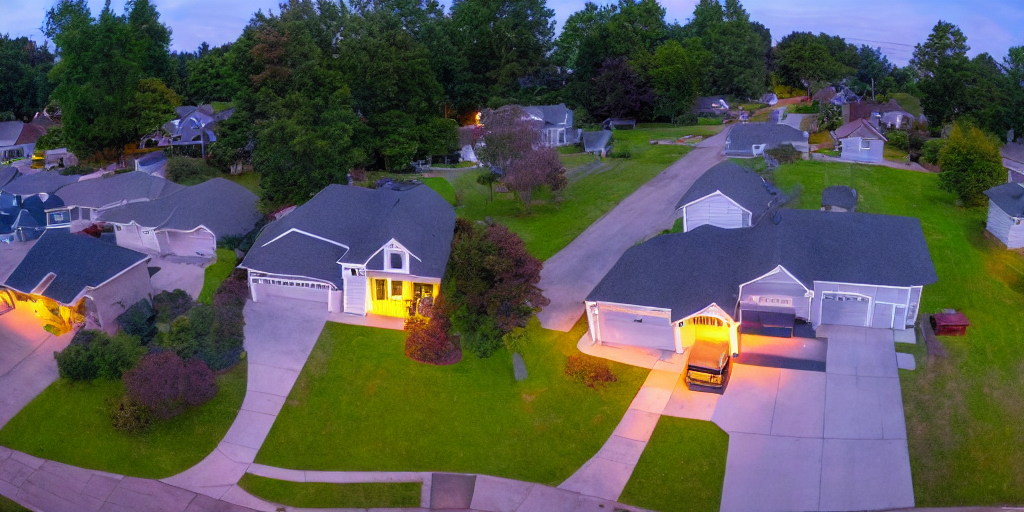
Given this image:

You would like to describe it using Ollama and moondream:1.8b model you can try cURL.

First encode image in base64:

base64 -w 0 snapshot.png > image.txt

Then prepare request:

echo '{   "model": "moondream:1.8b",   "prompt": "Describe",   "images": ["'$(cat image.txt)'"] }' > request.json

And finally invoke cURL pointing at your Ollama server running:

curl -X POST https://127.0.1:11434/api/generate -d @request.json

In response you could get somehing like this:

{"model":"moondream:1.8b","created_at":"2025-03-07T12:21:01.859560162Z","response":"\n","done":false}
{"model":"moondream:1.8b","created_at":"2025-03-07T12:21:01.868641283Z","response":"The","done":false}
{"model":"moondream:1.8b","created_at":"2025-03-07T12:21:01.876174776Z","response":" image","done":false}
{"model":"moondream:1.8b","created_at":"2025-03-07T12:21:01.88367435Z","response":" shows","done":false}
{"model":"moondream:1.8b","created_at":"2025-03-07T12:21:01.89146478Z","response":" a","done":false}
{"model":"moondream:1.8b","created_at":"2025-03-07T12:21:01.899594387Z","response":" backyard","done":false}
{"model":"moondream:1.8b","created_at":"2025-03-07T12:21:01.907526884Z","response":" scene","done":false}
{"model":"moondream:1.8b","created_at":"2025-03-07T12:21:01.914964805Z","response":" with","done":false}
{"model":"moondream:1.8b","created_at":"2025-03-07T12:21:01.922397395Z","response":" snow","done":false}
{"model":"moondream:1.8b","created_at":"2025-03-07T12:21:01.929796541Z","response":" covering","done":false}
{"model":"moondream:1.8b","created_at":"2025-03-07T12:21:01.937309637Z","response":" the","done":false}
{"model":"moondream:1.8b","created_at":"2025-03-07T12:21:01.944999728Z","response":" ground","done":false}
{"model":"moondream:1.8b","created_at":"2025-03-07T12:21:01.952626946Z","response":".","done":false}
{"model":"moondream:1.8b","created_at":"2025-03-07T12:21:01.960825233Z","response":" There","done":false}
{"model":"moondream:1.8b","created_at":"2025-03-07T12:21:01.968386276Z","response":" are","done":false}
{"model":"moondream:1.8b","created_at":"2025-03-07T12:21:01.975957591Z","response":" two","done":false}
{"model":"moondream:1.8b","created_at":"2025-03-07T12:21:01.983498832Z","response":" sets","done":false}
{"model":"moondream:1.8b","created_at":"2025-03-07T12:21:01.991128609Z","response":" of","done":false}
{"model":"moondream:1.8b","created_at":"2025-03-07T12:21:01.99872868Z","response":" chairs","done":false}
{"model":"moondream:1.8b","created_at":"2025-03-07T12:21:02.006291841Z","response":" and","done":false}
{"model":"moondream:1.8b","created_at":"2025-03-07T12:21:02.013746222Z","response":" benches","done":false}
{"model":"moondream:1.8b","created_at":"2025-03-07T12:21:02.021306533Z","response":" in","done":false}
{"model":"moondream:1.8b","created_at":"2025-03-07T12:21:02.028828964Z","response":" the","done":false}
{"model":"moondream:1.8b","created_at":"2025-03-07T12:21:02.036355269Z","response":" yard","done":false}
{"model":"moondream:1.8b","created_at":"2025-03-07T12:21:02.044167426Z","response":",","done":false}
{"model":"moondream:1.8b","created_at":"2025-03-07T12:21:02.052942866Z","response":" one","done":false}
{"model":"moondream:1.8b","created_at":"2025-03-07T12:21:02.061490474Z","response":" set","done":false}
{"model":"moondream:1.8b","created_at":"2025-03-07T12:21:02.069933296Z","response":" located","done":false}
{"model":"moondream:1.8b","created_at":"2025-03-07T12:21:02.077562662Z","response":" near","done":false}
{"model":"moondream:1.8b","created_at":"2025-03-07T12:21:02.087034194Z","response":" the","done":false}
{"model":"moondream:1.8b","created_at":"2025-03-07T12:21:02.094671298Z","response":" center","done":false}
{"model":"moondream:1.8b","created_at":"2025-03-07T12:21:02.102449099Z","response":"-","done":false}
{"model":"moondream:1.8b","created_at":"2025-03-07T12:21:02.110213167Z","response":"left","done":false}
{"model":"moondream:1.8b","created_at":"2025-03-07T12:21:02.118013956Z","response":" side","done":false}
{"model":"moondream:1.8b","created_at":"2025-03-07T12:21:02.125782415Z","response":" of","done":false}
{"model":"moondream:1.8b","created_at":"2025-03-07T12:21:02.133744283Z","response":" the","done":false}
{"model":"moondream:1.8b","created_at":"2025-03-07T12:21:02.141543102Z","response":" frame","done":false}
{"model":"moondream:1.8b","created_at":"2025-03-07T12:21:02.149604519Z","response":" and","done":false}
{"model":"moondream:1.8b","created_at":"2025-03-07T12:21:02.157338891Z","response":" another","done":false}
{"model":"moondream:1.8b","created_at":"2025-03-07T12:21:02.165317974Z","response":" set","done":false}
{"model":"moondream:1.8b","created_at":"2025-03-07T12:21:02.173592206Z","response":" situated","done":false}
{"model":"moondream:1.8b","created_at":"2025-03-07T12:21:02.18192298Z","response":" towards","done":false}
{"model":"moondream:1.8b","created_at":"2025-03-07T12:21:02.189629925Z","response":" the","done":false}
{"model":"moondream:1.8b","created_at":"2025-03-07T12:21:02.197264121Z","response":" right","done":false}
{"model":"moondream:1.8b","created_at":"2025-03-07T12:21:02.204874696Z","response":" side","done":false}
{"model":"moondream:1.8b","created_at":"2025-03-07T12:21:02.212457215Z","response":".","done":false}
{"model":"moondream:1.8b","created_at":"2025-03-07T12:21:02.220122564Z","response":" The","done":false}
{"model":"moondream:1.8b","created_at":"2025-03-07T12:21:02.227777943Z","response":" chairs","done":false}
{"model":"moondream:1.8b","created_at":"2025-03-07T12:21:02.235415009Z","response":" appear","done":false}
{"model":"moondream:1.8b","created_at":"2025-03-07T12:21:02.243121933Z","response":" to","done":false}
{"model":"moondream:1.8b","created_at":"2025-03-07T12:21:02.250735614Z","response":" be","done":false}
{"model":"moondream:1.8b","created_at":"2025-03-07T12:21:02.258662805Z","response":" made","done":false}
{"model":"moondream:1.8b","created_at":"2025-03-07T12:21:02.266973244Z","response":" of","done":false}
{"model":"moondream:1.8b","created_at":"2025-03-07T12:21:02.27468176Z","response":" wood","done":false}
{"model":"moondream:1.8b","created_at":"2025-03-07T12:21:02.282282895Z","response":" or","done":false}
{"model":"moondream:1.8b","created_at":"2025-03-07T12:21:02.289846955Z","response":" metal","done":false}
{"model":"moondream:1.8b","created_at":"2025-03-07T12:21:02.297592391Z","response":",","done":false}
{"model":"moondream:1.8b","created_at":"2025-03-07T12:21:02.305465971Z","response":" while","done":false}
{"model":"moondream:1.8b","created_at":"2025-03-07T12:21:02.313191208Z","response":" the","done":false}
{"model":"moondream:1.8b","created_at":"2025-03-07T12:21:02.321349494Z","response":" benches","done":false}
{"model":"moondream:1.8b","created_at":"2025-03-07T12:21:02.329920293Z","response":" have","done":false}
{"model":"moondream:1.8b","created_at":"2025-03-07T12:21:02.340090732Z","response":" a","done":false}
{"model":"moondream:1.8b","created_at":"2025-03-07T12:21:02.34802664Z","response":" similar","done":false}
{"model":"moondream:1.8b","created_at":"2025-03-07T12:21:02.355866217Z","response":" design","done":false}
{"model":"moondream:1.8b","created_at":"2025-03-07T12:21:02.363689099Z","response":".","done":false}
{"model":"moondream:1.8b","created_at":"2025-03-07T12:21:02.3714811Z","response":" A","done":false}
{"model":"moondream:1.8b","created_at":"2025-03-07T12:21:02.379121817Z","response":" p","done":false}
{"model":"moondream:1.8b","created_at":"2025-03-07T12:21:02.3867409Z","response":"otted","done":false}
{"model":"moondream:1.8b","created_at":"2025-03-07T12:21:02.394364121Z","response":" plant","done":false}
{"model":"moondream:1.8b","created_at":"2025-03-07T12:21:02.402002067Z","response":" can","done":false}
{"model":"moondream:1.8b","created_at":"2025-03-07T12:21:02.409639127Z","response":" also","done":false}
{"model":"moondream:1.8b","created_at":"2025-03-07T12:21:02.417480073Z","response":" be","done":false}
{"model":"moondream:1.8b","created_at":"2025-03-07T12:21:02.425250071Z","response":" seen","done":false}
{"model":"moondream:1.8b","created_at":"2025-03-07T12:21:02.434030379Z","response":" on","done":false}
{"model":"moondream:1.8b","created_at":"2025-03-07T12:21:02.441586322Z","response":" the","done":false}
{"model":"moondream:1.8b","created_at":"2025-03-07T12:21:02.44953472Z","response":" left","done":false}
{"model":"moondream:1.8b","created_at":"2025-03-07T12:21:02.457934826Z","response":" side","done":false}
{"model":"moondream:1.8b","created_at":"2025-03-07T12:21:02.466621776Z","response":" of","done":false}
{"model":"moondream:1.8b","created_at":"2025-03-07T12:21:02.474522367Z","response":" the","done":false}
{"model":"moondream:1.8b","created_at":"2025-03-07T12:21:02.482164977Z","response":" image","done":false}
{"model":"moondream:1.8b","created_at":"2025-03-07T12:21:02.489806331Z","response":",","done":false}
{"model":"moondream:1.8b","created_at":"2025-03-07T12:21:02.497422616Z","response":" adding","done":false}
{"model":"moondream:1.8b","created_at":"2025-03-07T12:21:02.505029007Z","response":" some","done":false}
{"model":"moondream:1.8b","created_at":"2025-03-07T12:21:02.512655886Z","response":" gre","done":false}
{"model":"moondream:1.8b","created_at":"2025-03-07T12:21:02.520270742Z","response":"enery","done":false}
{"model":"moondream:1.8b","created_at":"2025-03-07T12:21:02.527950115Z","response":" to","done":false}
{"model":"moondream:1.8b","created_at":"2025-03-07T12:21:02.535610963Z","response":" the","done":false}
{"model":"moondream:1.8b","created_at":"2025-03-07T12:21:02.543517032Z","response":" snowy","done":false}
{"model":"moondream:1.8b","created_at":"2025-03-07T12:21:02.551320555Z","response":" landscape","done":false}
{"model":"moondream:1.8b","created_at":"2025-03-07T12:21:02.559147856Z","response":".","done":false}
{"model":"moondream:1.8b","created_at":"2025-03-07T12:21:02.566976927Z","response":"","done":true,"done_reason":"stop","context":[18233,25,220,58,9600,12,15,60,198,198,24564,4892,628,23998,25,220,198,464,2939,2523,257,24296,3715,351,6729,9505,262,2323,13,1318,389,734,5621,286,18791,290,43183,287,262,12699,11,530,900,5140,1474,262,3641,12,9464,1735,286,262,5739,290,1194,900,22765,3371,262,826,1735,13,383,18791,1656,284,307,925,286,4898,393,6147,11,981,262,43183,423,257,2092,1486,13,317,279,8426,4618,460,635,307,1775,319,262,1364,1735,286,262,2939,11,4375,617,10536,24156,284,262,46742,10747,13],"total_duration":1117786111,"load_duration":20986309,"prompt_eval_count":740,"prompt_eval_duration":369000000,"eval_count":91,"eval_duration":717000000}