I was trying to add some new packages and figured it out that my Ubuntu 21 is out of date. Unfortunately some time ago I unchecked all repositories in Software & Updates so my /etc/apt/sources.list was empty. But I managed to have it working properly adding this one:
deb http://old-releases.ubuntu.com/ubuntu impish main universe
Next
apt update
and I was more or less back on the track. How trivial was it just to be able to install default-jre package as I am trying to learn how to build custom deb packages.
Latest Clustercontrol – version 1.9.4 – installation somehow requires pg_stat_statements to be activated in PostgreSQL 14. I have never noticed it before, both on 9.6, 12 and 14. This is simple fix. Change postgresql.conf configuration file (which should be either in /etc or /var/lib/ in standard package installations):
If you need to mirror remote repository and push it to another remote repo, then there is one thing you should do to be able to export all remote branches and not only the master.
git remote add NAME URL
for remote in `git branch -r `; do git branch --track $remote; done
git push --all NAME
It will push all things remotely, but it varies from version to version so better double check.
Using CentOS7 templates on Azure could result in lack of LVM, swap and non auto-extendable partitions. Some other templates have such feature, but not all of them. In case you assigned bigger disk in Azure portal you need still to do few things. First delete /dev/sda2 partition:
Old Zabbix Proxy 4.2 installation could be quite confusing as you cannot grab the latest one to work with old Zabbix server. Fortunately there is archive packages repository at repo.zabbix.com/zabbix/4.2/ubuntu/pool/main/z/zabbix/. You need to keep track which operating systemu should be used. Refer to server requirements as it will be the same. So it’s Ubuntu 14, 16 or 18. First you should grab repository package which can be found named zabbix-release. For example:
zabbix-release_4.2-2+bionic_all.deb
After installation with dpkg command, you can install particular proxy package with either MySQL, PostgreSQL or SQLite3.
zabbix-proxy-mysql_4.2.1-1%2Bbionic_amd64.deb
If you choose MySQL then you need to manually install database package:
sudo apt-get install mysql-server
Then:
service mysql start
service mysql status
mysql
create database zabbix_proxy;
create user zabbix@localhost identified by 'yourpassword';
grant all privileges on zabbix_proxy.* to zabbix@localhost;
quite;
Now you are good to go with loading structure and data into the database:
zcat /usr/share/doc/zabbix-sql-scripts/mysql/server.sql.gz | mysql -uzabbix -p zabbix_proxy
It could take few minutes to complete. Now it’s time to set configuration parameters in /etc/zabbix/zabbix_proxy.conf file:
If you happen to use Proxmox’s LXC which stands for Linux Containers, then you might be interested in this one. Proxmox has this turnkey containers available to download from its UI. Among them there is WordPress. If you create a container using template then while creating remember to select nesting=on, because without this it will show permission denied on starting Apache2. Not quite familiar with nesting option but it is necessary to run this container.
PostgreSQL 14 has few improvements over previous versions, especially older ones, like 9.6. This includes automatic data direction using partitioning. So, let’s install it on CentOS 7.
I strongly recommend visiting pgtune.leopard.in.ua for tuning parameters. Last thing is to set interface address on which server will be listening, it’s set in:
[204] This is the SI unit of resistance. 1 ohm is the electrical resistance between two points on a conductor when a constant potential difference of one volt between the two points causes a current of one ampere in the conductor.
Eq. Unit of resistance
Most, if not all, components have internal resistance, such as batteries. It is not a property that is easily measurable. Circuits intended to show some principles assume that, for example, the power source is an ideal cell and any internal resistances are compensated by additional components of such a circuit, assuming a certain margin of error.
Feeding a resistor with too low resistance in a single-element system causes de facto short-circuit of the contacts of the power source, e.g. a battery, which will probably lead to its degradation. The larger the cross-section of the conductor, the lower its resistance and the larger the surface capable of dissipating heat – hence the conductor can withstand a higher current intensity.
[202] The intensity of the current through a conductor is directly proportional to the voltage applied between its ends. If the resistance is kept constant, then increasing the voltage will increase the amperage. At constant voltage, increasing the resistance reduces the amperage.
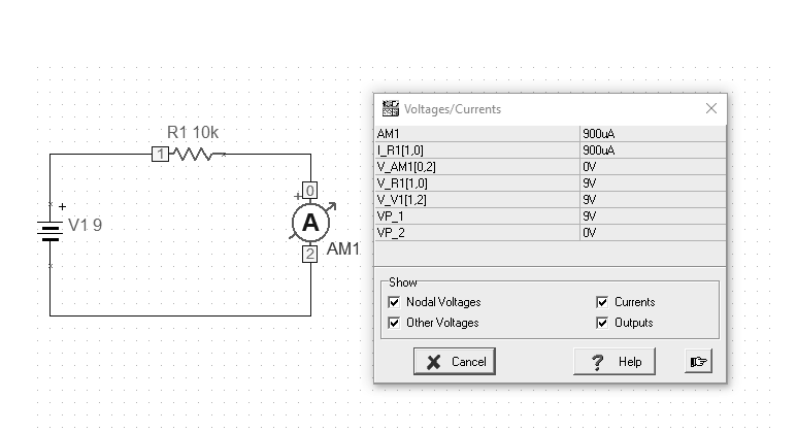
[202] Assuming that the battery has a voltage of 9V as the source of electrical energy and the resistor shows a resistance of 10k Ω, then the ammeter, which is connected in series to the circuit, will give a result of about 900mA. This result should also include the internal resistance of the ammeter and the actual battery voltage. The resistance of the circuit itself should also be taken into account. The result of 0.9A will therefore only be an approximation.
Fig. An example of a circuit with a battery, resistor and ammeter (p01)
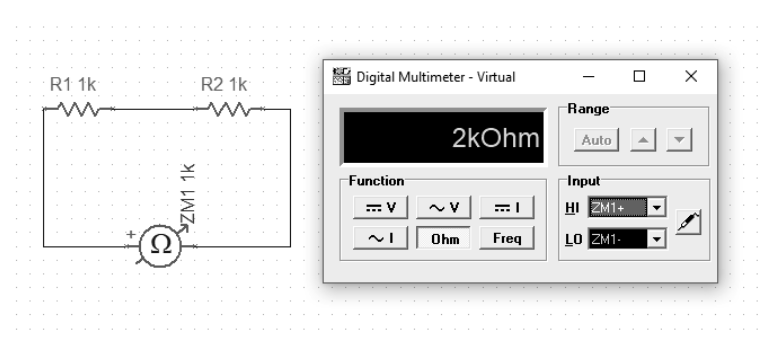
The next example will show how we measure the resistance of series-connected resistors. It is simply their sum.
Fig. Sum of series resistance values (p02)
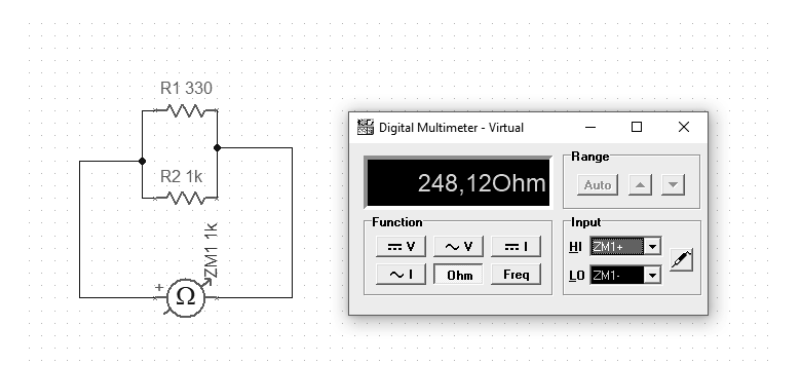
For comparison, we can connect the resistors in parallel. Here, the calculation of the output value of the resistance is slightly different and is described by the formula:
Eq. Parallel resistanceFig. Connecting resistors in parallel (p03)
With this connection, the effective resistance will be less than the smallest component in such a parallel configuration.
“[Georg Simon Ohm] He formulated (1827) a law describing the relationship between the intensity of an electric current and electric voltage, known today as Ohm’s law. He investigated the heating of conductors with the flow of electric current. He found the dependence of resistance from the geometric form of the conductor” [W]
Construction and testing of circuits in the TINA TI program
To translate theory into practice, we can use the TINA package from DesignSoft for Texas Instruments. It is a tool for building virtual analog and digital circuits. The basic version provides the minimum necessary set of elements that can be arranged in the form of a circuit. However, the most important function (at least for me) is the ability to run simulations.
Fig. Available circuit elements in the TINA package
All presented examples of simulations are prepared in TINA TI V9 (Schematic Editor), Special Complementary Basic Edition available free of charge. The schema sources are in the repository for this publication, for independent study github.com/michalasobczak/simple_hpc in the folder SeriesPartOne.
Fig. Oscilloscope [W]
[101] For the purpose of studying a system, the concepts of linearity and non-linearity are adopted. A system with at least one nonlinear element will be a nonlinear system. Nonlinearity consists in the inability to describe the current-voltage characteristic of a given element in the form of a straight equation. When describing a mixed system, consisting of both linear and nonlinear elements, the point of intersection of their characteristics will be the working point.
Note: If we do not need to test the circuit, we can use other packages for electronics such as Frizting, LibrePCB or EAGLE.