synopticly: a two-week service map for an OpenShift cluster
Disclaimer: the projects described here are the result of my own independent work, done without the use of AI. This article itself was written with the help of AI.
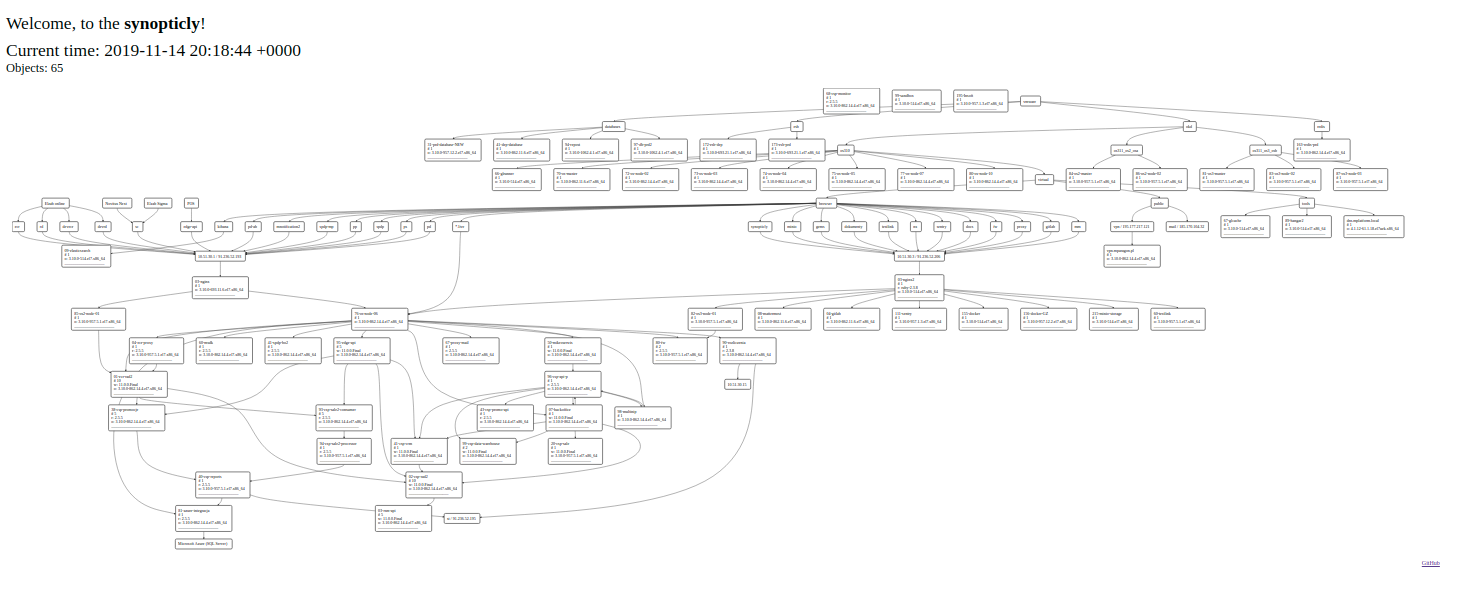
In November 2019 we needed a single picture of an application cluster on OpenShift/OKD: which applications are running, on how many pods, on which runtime versions, how loaded the hosts are, and how data flows between them. Something like a synoptic panel in a control room, but for microservices.
The obvious candidates were Elasticsearch + Kibana (Canvas, visualisations), Grafana, or the monitoring built into newer OKD versions. Each of them could do it, but none in the time we had. So I wrote synopticly: about 100 commits between 31 October and 17 November 2019, three components, and a diagram that showed 65 objects on the first day.
Architecture #
 ┌──────────── container ────────────┐
 │ application   synopticly-agent    │──┐
 └───────────────────────────────────┘  │   HTTP GET every 5 s
 ┌──────────── container ────────────┐  │
 │ application   synopticly-agent    │──┼──▶ API (Sinatra) ──▶ PostgreSQL ◀── panel (Rails, dagre-d3)
 └───────────────────────────────────┘  │
              ...  × 65                ─┘
| Component | Technology | Runs as |
|---|---|---|
| agent | C++, statically linked, 64-bit Linux | a background process inside each application container |
| API | Ruby, Sinatra, ActiveRecord | Docker container michalasobczak/synopticly |
| panel | Ruby on Rails, d3, graphlib-dot, dagre-d3 | Docker container michalasobczak/synopticly-visualization-panel |
Agent #
The agent is a single static binary, so it runs in any image without installing anything: Ruby, WildFly/Java and RHEL-based containers alike. It is added to the container start script:
RUN echo "cd /opt && wget https://github.com/michalasobczak/synopticly/raw/develop/agent/Debug/synopticly-agent" >> /opt/runner.sh
RUN echo "chmod +x /opt/synopticly-agent" >> /opt/runner.sh
RUN echo "/opt/synopticly-agent &" >> /opt/runner.sh
RUN cd /opt/ && echo '{"api_url": "0.0.0.0:4567"}' >> /opt/synopticly_config.json
ENTRYPOINT /opt/runner.sh
The application name comes from OPENSHIFT_BUILD_NAMESPACE, so no per-application configuration is needed. On start the agent reads the hostname, OS version and runtime versions (Ruby, WildFly). Then it loops forever:
while (true) {
  if (!APP_NAME.empty()) {
    UPTIME    = url_encode(exec("uptime"));
    PROCESSES = url_encode(exec("top -b -c -n1 | awk '{ if (NR == 2) { print $0 }  }' | base64"));
    send_data_to_api();
  }
  sleep_for(5000);
}
top -b (batch mode) matters: without it top wants a terminal, which a background process in a container does not have. That was one of the commits on the last day.
Libraries: HTTPRequest for the client, nlohmann/json for the config file and Boost string algorithms. Static linking was the price for not depending on the GLIBCXX version in old RHEL 7 images.
API #
The API is one Sinatra route. Every request becomes a row in entries; a new application name creates a row in applications. Data older than a minute is deleted on every request, so the table never grows:
get '/' do
  e = Entry.new
  e.app_name   = params["app_name"] rescue "n/a"
  e.hostname   = params["h"]        rescue "n/a"
  e.uptime     = params["up"]       rescue "n/a"
  e.processes  = Base64.decode64(params["pr"]) rescue "n/a"
  # ... runtime and OS versions
  app = Application.where("app_name = ?", e.app_name).first
  # create the application on first report
  e.save!
  Entry.where("created_at <= now() - interval '1 minutes'").delete_all
  app.body.blank? ? "{}" : app.body
end
It needs only DATABASE_HOST and DATABASE_PASS; the database and user are both called synopticly. I ran it from Portainer with restart policy always.
Panel #
The Rails panel reads the last 15 seconds of entries and builds the diagram:
- number of distinct hostnames per application = number of running pods,
- Ruby / WildFly / OS version of the newest entry,
- host load average and uptime parsed from
uptime, - task counts parsed from
top.
The graph is described in Graphviz DOT and laid out in the browser with graphlib-dot and dagre-d3. Relations between applications (the arrows) come from the flows table (input → output), maintained by hand. Near the end Turbolinks went out and the data preparation moved from the view to the controller.
Roadmap vs. reality #
The README has a roadmap from r0 to r3: application metrics, relationship management, authentication, TLS between agent and API, table partitioning, server monitoring. Only r0 got done, and that was enough: the goal was a working map of about 50 applications reporting every few seconds, and that is what we got. The repository is archived.
What I took from it #
- Sometimes the right answer to "which monitoring platform?" is a few hundred lines of your own code. The tool did one thing for one team, and nobody had to learn a new platform.
- A static binary dropped into the start script is the least intrusive agent possible. No sidecars, no changes to the images' package lists.
- Keeping only the last minute of data turned "storage" into a non-problem. A synoptic panel needs now, not history.
- If it had lived longer, the next step would have been Prometheus exporters and Grafana. The prototype was the fastest way to find out which numbers were worth exporting.
Source: github.com/michalasobczak/synopticly. See also the overview of my hands-on projects.